
What's new in the 2027 version?
The 2027 release is not just another update — it is a program written from the ground up. Below are the most important changes compared with the 2026 version.
Rewritten from scratch, fully 64-bit
The program was built from the ground up on .NET 10 with a WPF interface — Microsoft’s latest technology. The 2026 release was a 32-bit application running on an engine from 1998. The 2027 version is fully 64-bit, so it uses all the memory available and works faster with large databases. Separate x64 and native ARM64 installers.
See more (Polish) →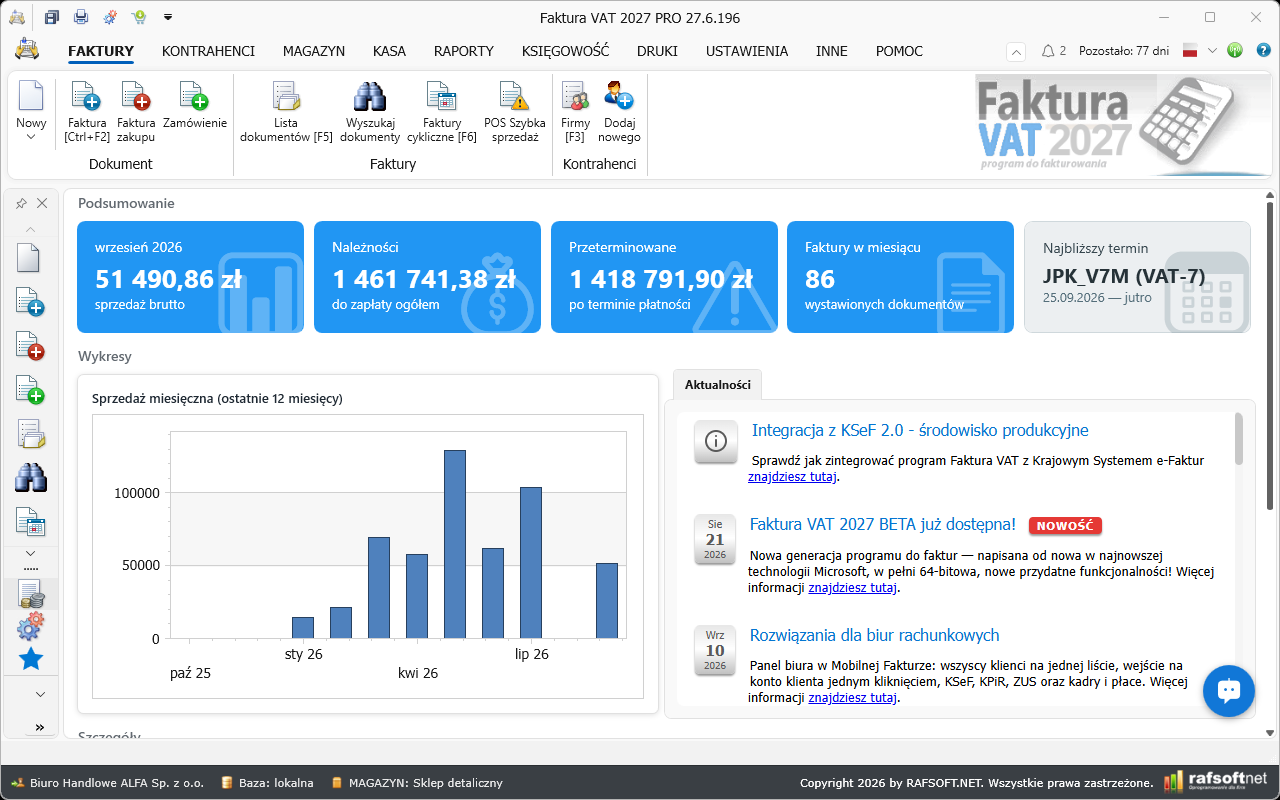
Modern interface working modes
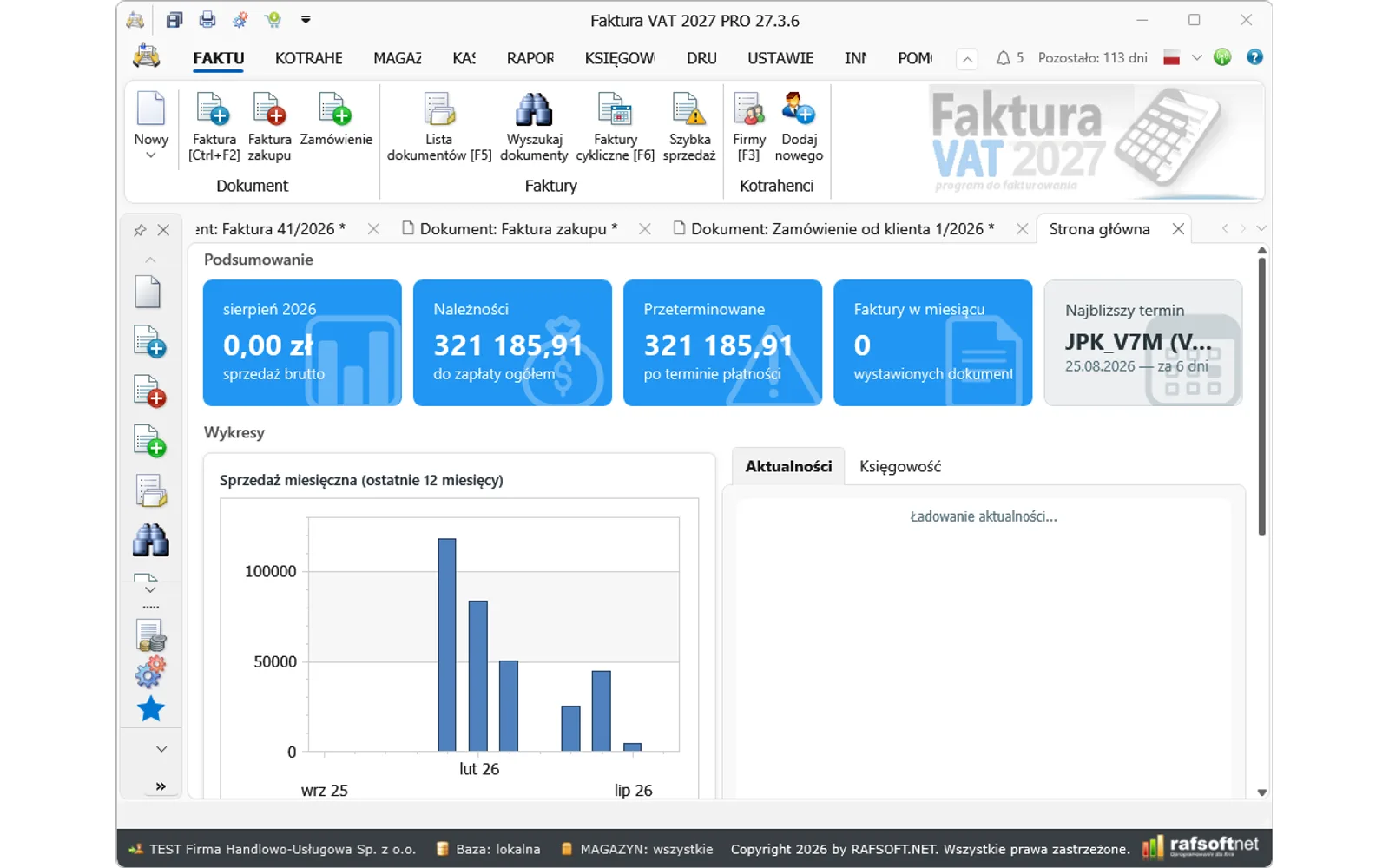
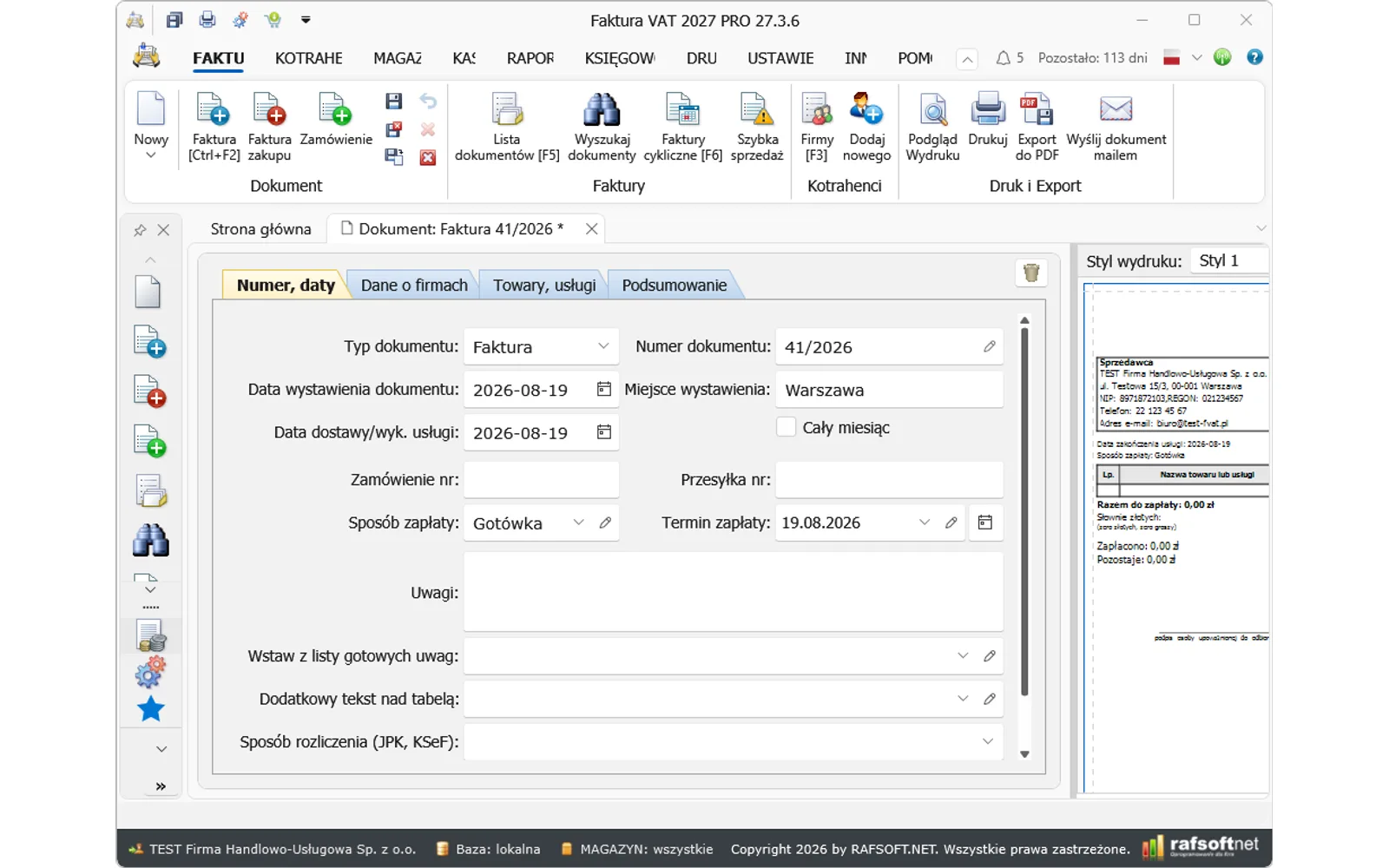
You set the look of the application to suit yourself: three profiles — Classic (separate windows and buttons at the bottom, as in FVAT 2021–2026), Modern (tabs, a ribbon and navigation) and Custom with any combination of options. Program windows open inside the application or as separate windows outside it, you can turn bars and buttons off, and on top of that you choose the program style and colours, the application font and the look of lists and tables.
See more (Polish) →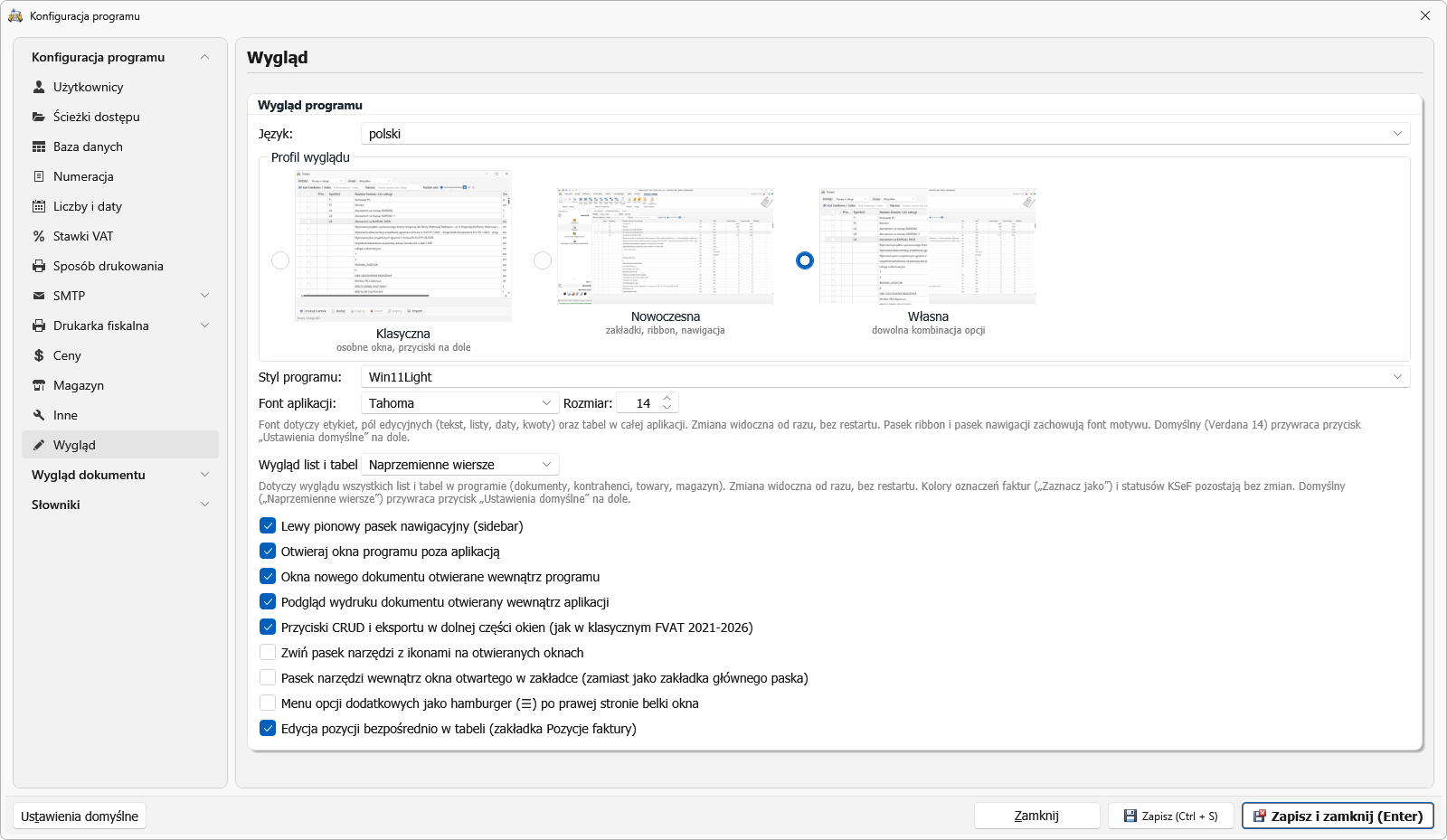
KSeF with certificate sign-in — a new client written in C#
The KSeF client has been rewritten in C#. There is a new Authentication tab with four sign-in methods: a KSeF token, a qualified certificate or seal from the Windows store, a certificate from a PFX file and an internal KSeF certificate — with the full certificate application cycle handled straight from the program. In 2026 signing in was possible only with a token pasted in by hand from the ministry portal.
See more (Polish) →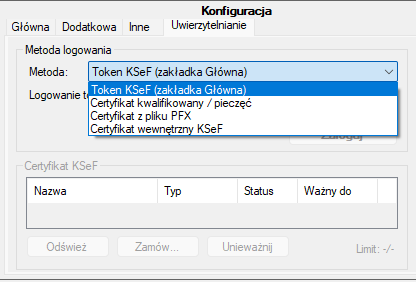
KSeF offline modes — invoices with no connection to the system
A KSeF outage or no internet connection will not stop your sales. The program supports all four special modes: offline24, unavailability, a KSeF failure and a total failure. An offline invoice gets two QR codes on the printout (OFFLINE + CERTIFICATE) in line with the ministry specification, and the program keeps track of the statutory deadline itself and sends outstanding invoices automatically once the connection is back. JPK markers (DI/OFF/BFK) are selected automatically according to the issuing mode.
See more (Polish) →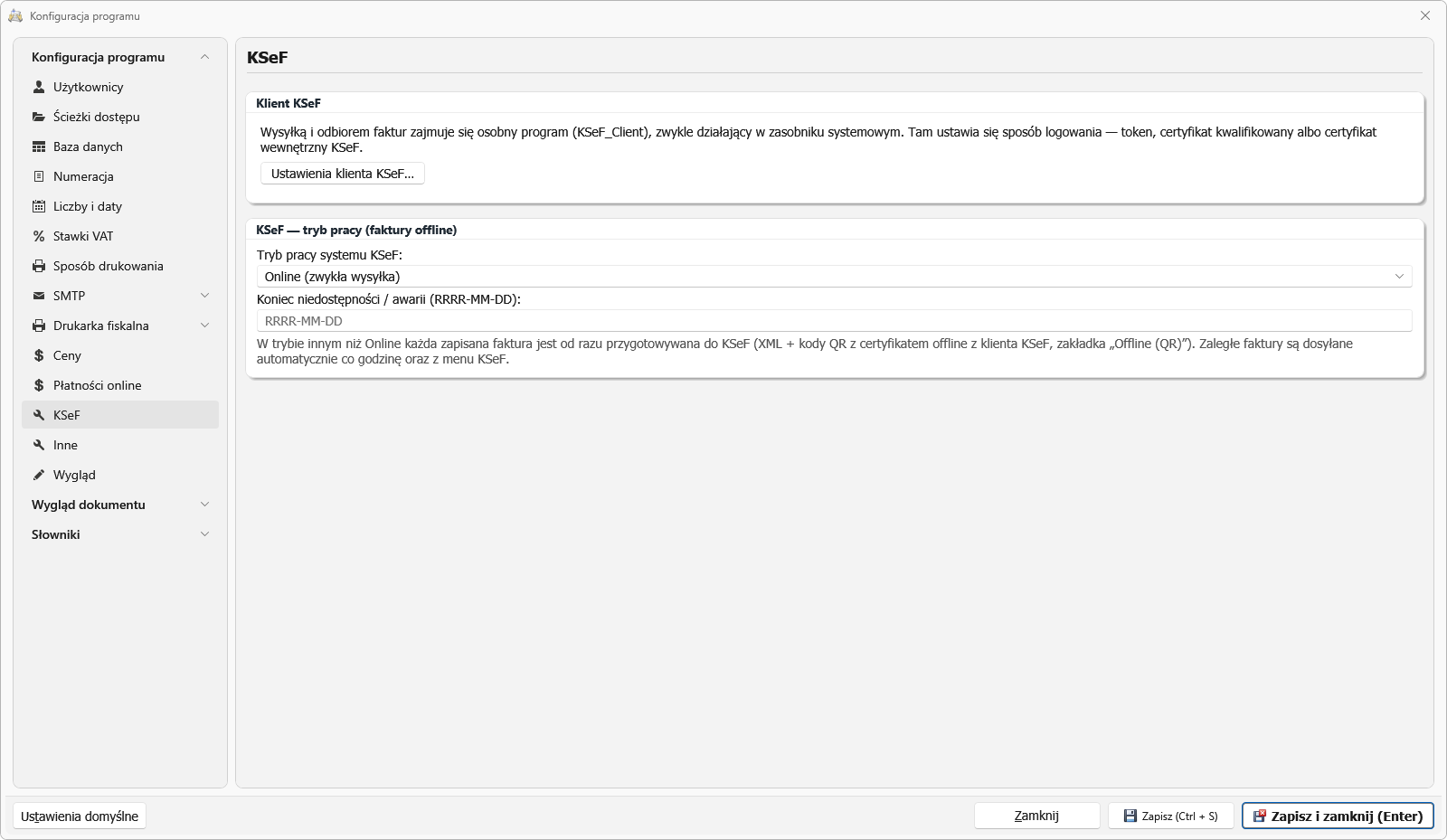
Sales invoices from KSeF — import with approval
Sales issued outside the program — in the Taxpayer Application or another system — come back into your records with a single download. You pick the period and the invoices land in a waiting room with manual approval: nothing enters your records without your consent. The program recognises corrections and advance invoices by itself, keeps the number from KSeF without breaking your own numbering and watches out for duplicates — it skips your own sent invoices automatically. On top of that you can import a single invoice from an XML file.
See more (Polish) →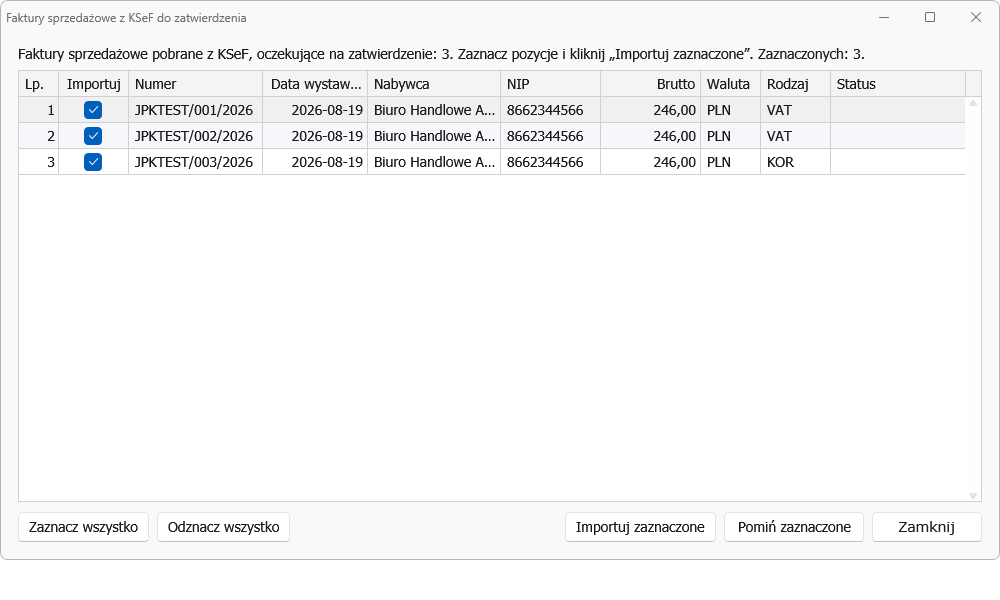
You see what goes to KSeF — before it goes
A submission to KSeF cannot be undone, so the program shows you a list of invoices before sending: the number, the buyer, the amount and a preview of the invoice itself alongside. The header tells you how many documents will go and for what total amount. You can untick individual items, or cancel the whole submission — in which case nothing is sent. The Notes column warns you in advance about things KSeF may reject: a currency with no exchange rate, a date from another month, a rate outside your configuration. A separate section explains what will not be sent and why. An invoice can also be permanently blocked — one like that will not go even if ticked by hand.
See more (Polish) →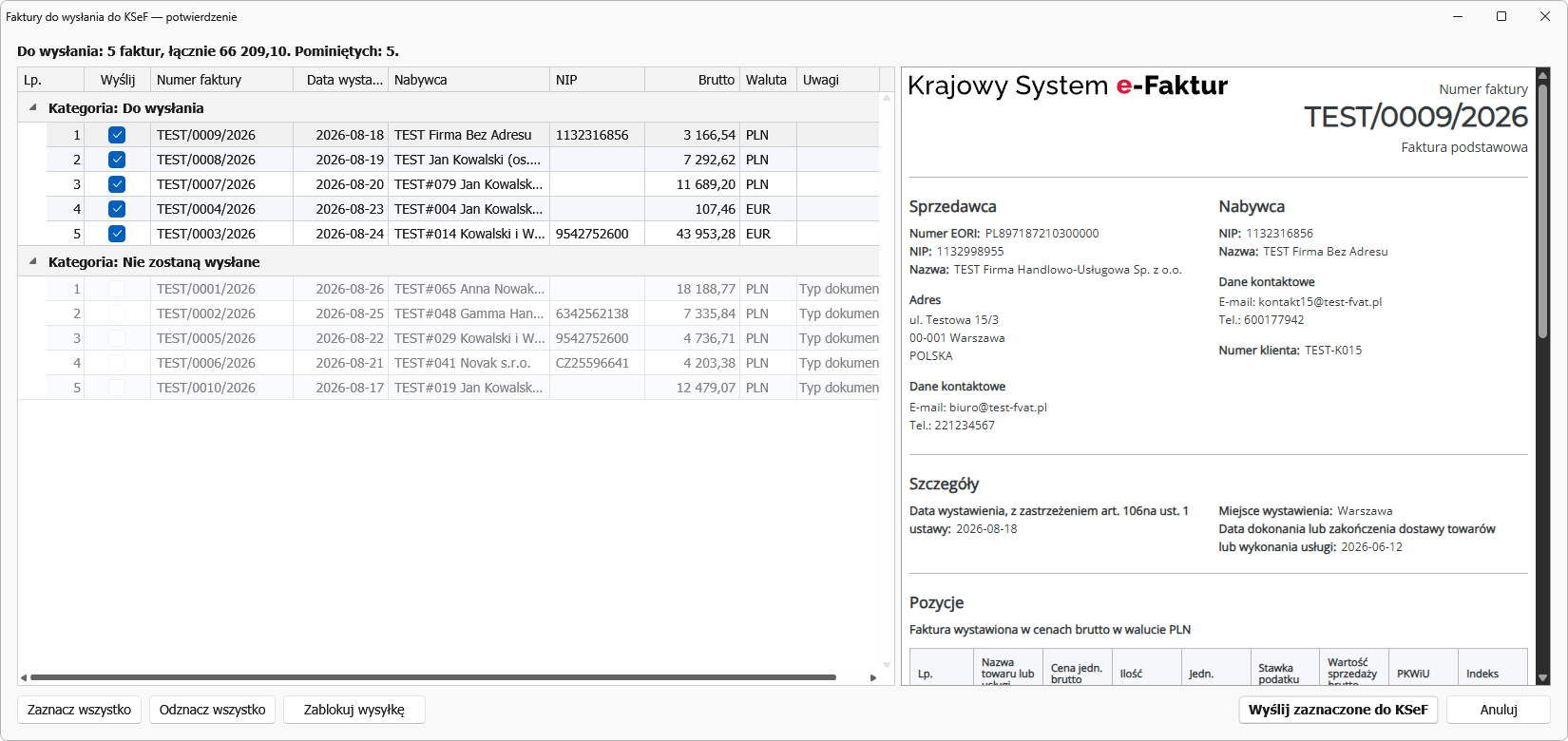
Purchase invoices wait for your approval
Invoices issued to your company no longer slip quietly into your records — they wait in a buffer. You look at each one exactly as your supplier issued it, and you decide which to approve. Regular suppliers can be marked as trusted — their invoices arrive already ticked, so a confirmation is all it takes. When the KSeF client picks something up in the background, the program will notify you in the corner of the screen. Prefer the old way? Approval can be switched off with a single toggle.
See more (Polish) →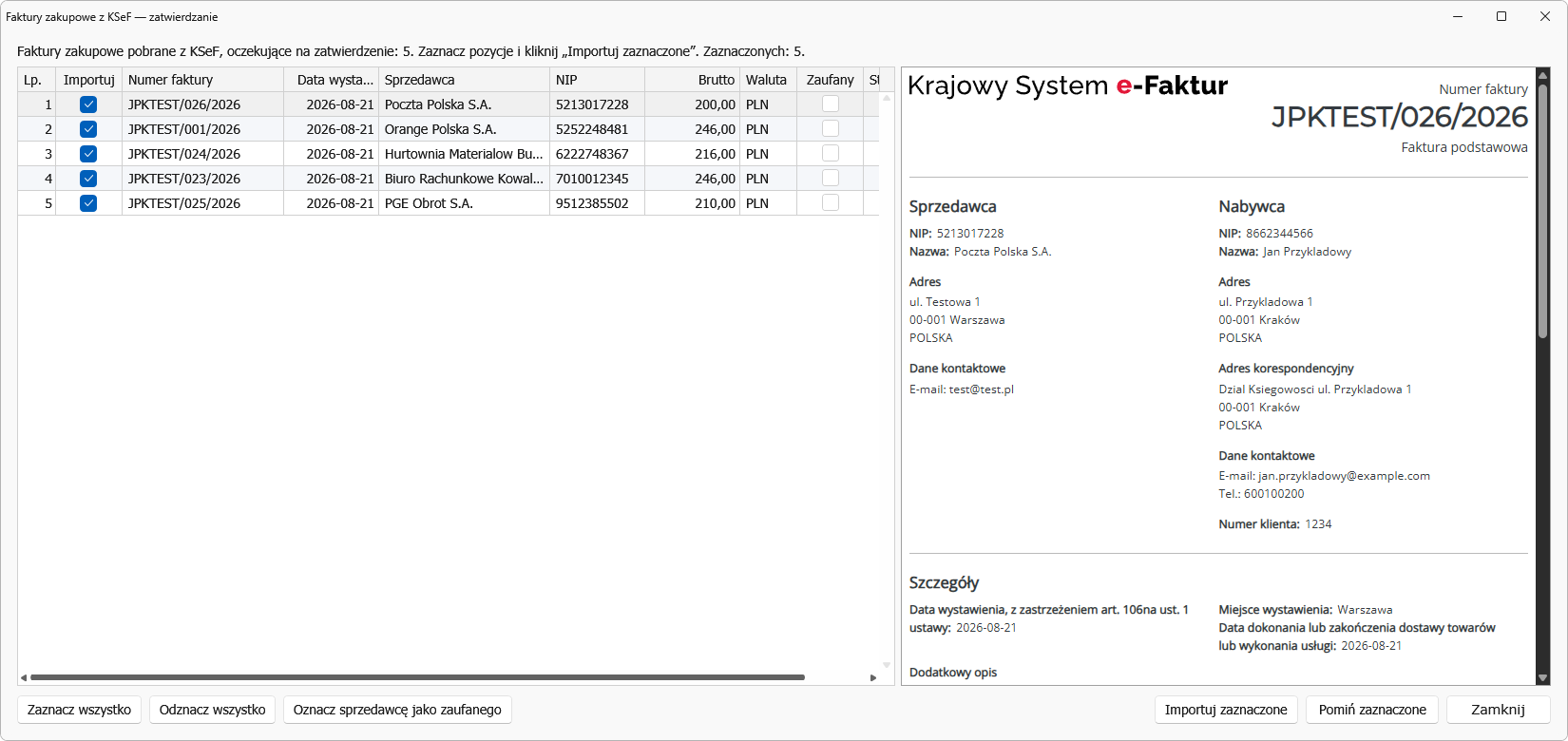
Purchases from KSeF straight into the warehouse
Until now a purchase invoice downloaded from KSeF went into your records only — the warehouse knew nothing about it. The program can now take the goods into stock and issue a PZ, with the batch valued at the price from the invoice. Nothing happens quietly: first you see a list of items matched against your own catalogue and you decide what goes in. The program tells you outright what it will not accept and why — services, corrections or items in a unit other than the catalogue one. Links to a supplier’s goods are remembered automatically, so the next invoice from them needs no attention at all.
See more (Polish) →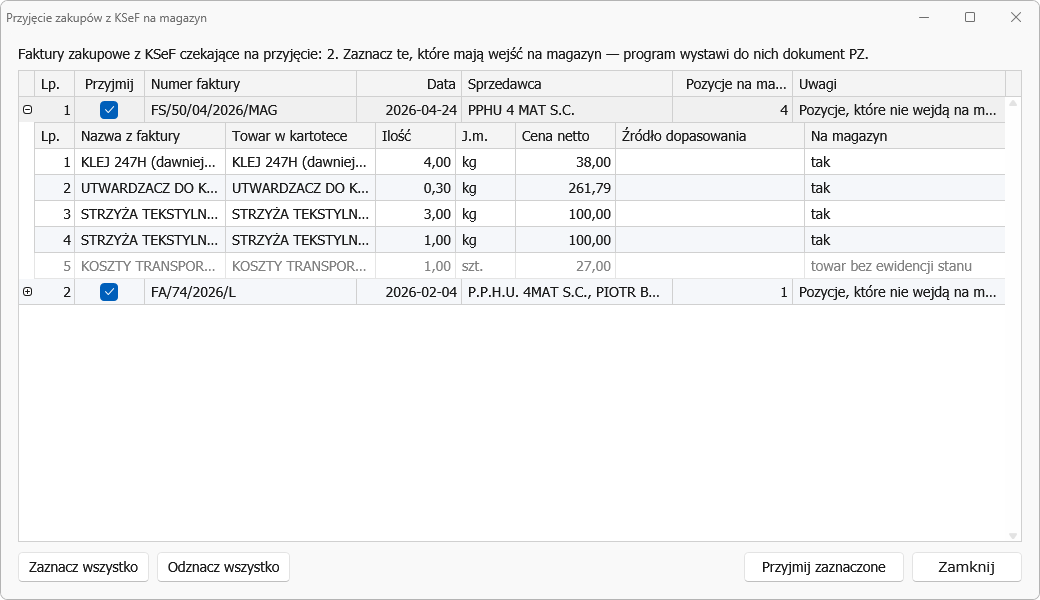
Invoice preview before sending to KSeF
A new KSeF (visualisation) printout style: while you are still issuing the document you see in the preview exactly what the recipient will see in the National e-Invoicing System — with the number, both parties’ details, party roles and line items. You can check the document before it reaches KSeF — without sending it and without going to the ministry portal.
See more (Polish) →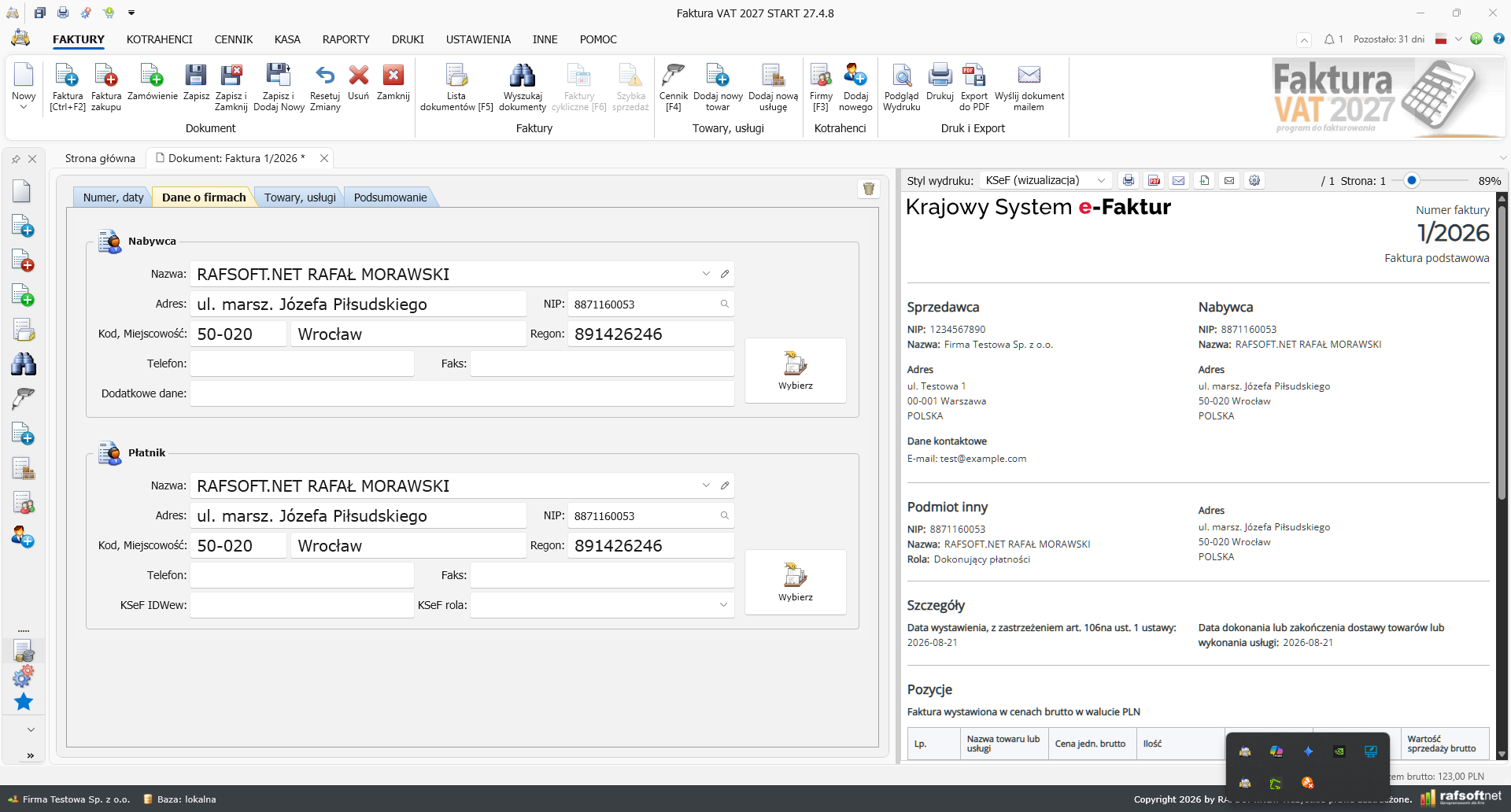
Full bookkeeping: KPiR, lump-sum tax and the annual PIT return
A new tax pillar in the PRO edition: the book of revenues and expenses, lump-sum tax records, PIT advance payments, fixed assets with depreciation, ZUS contribution variants (standard, preferential, relief for a start, Small ZUS Plus) and the annual PIT-36, PIT-36L and PIT-28 returns validated against the Ministry of Finance XSD schemas.
See more (Polish) →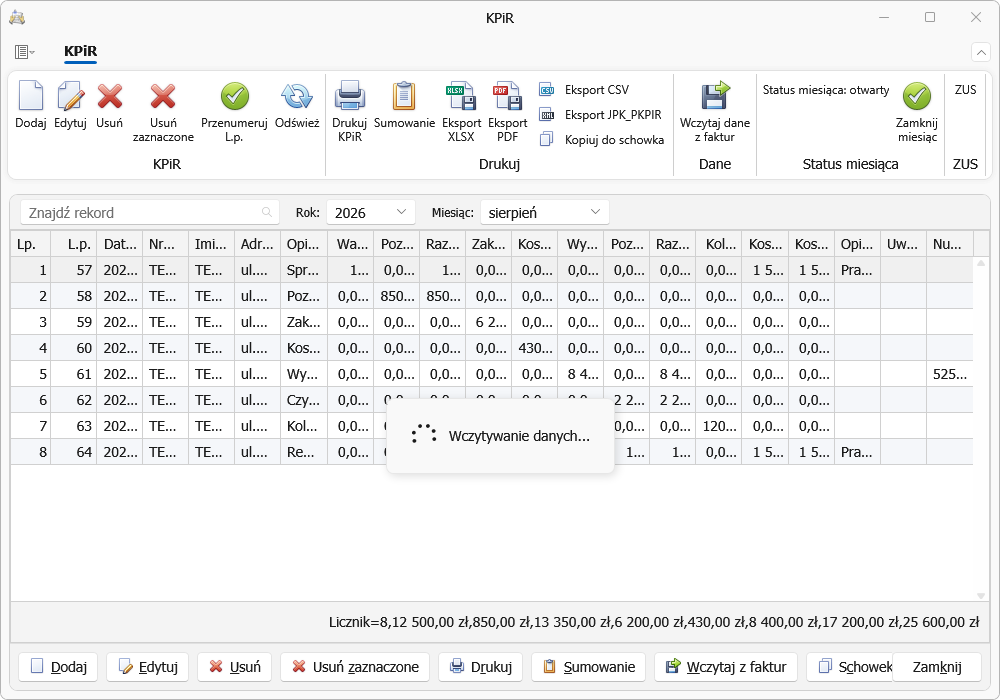
Warehouse with stocktaking and issue valuation
A stocktake has been added — a counting sheet, differences, a stock correction and the INW section in JPK_MAG(2). New issue valuation (FIFO, LIFO, AVCO, FEFO), bundles with component issue, price history on the product card and an individual contractor price list with its own prices and discounts.
See more (Polish) →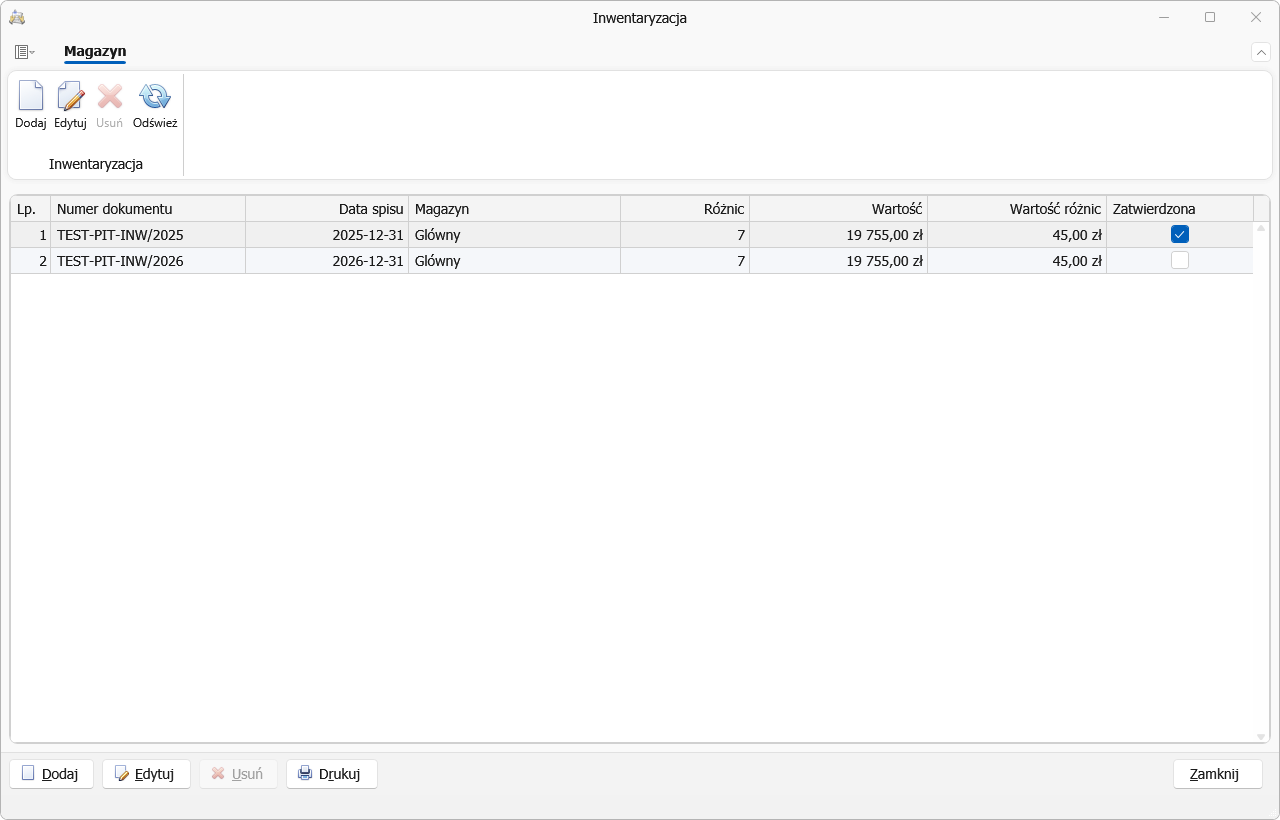
Bank statements and automatic payment matching
Import of bank statements with automatic matching of payments to invoices, export of a transfer batch in the Elixir format and a JPK_WB file on demand from the authorities. There is also bad debt relief with automatic detection of candidates for correction.
See more (Polish) →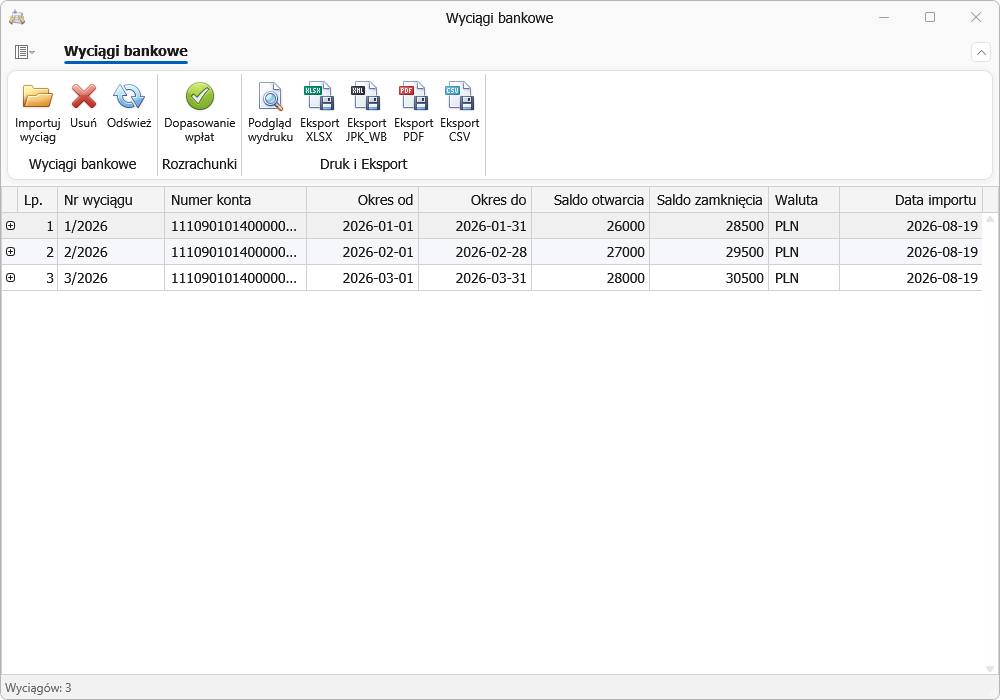
Gentle debt collection
The program keeps an eye on overdue invoices for you: you send your customers payment reminders, and the level of the demand is chosen automatically to match how long the payment is overdue — from a polite reminder to a final pre-court demand. On top of that there is an interest note that calculates late-payment interest, an interest calculator and a payment register that shows at a glance who is in arrears.
See more (Polish) →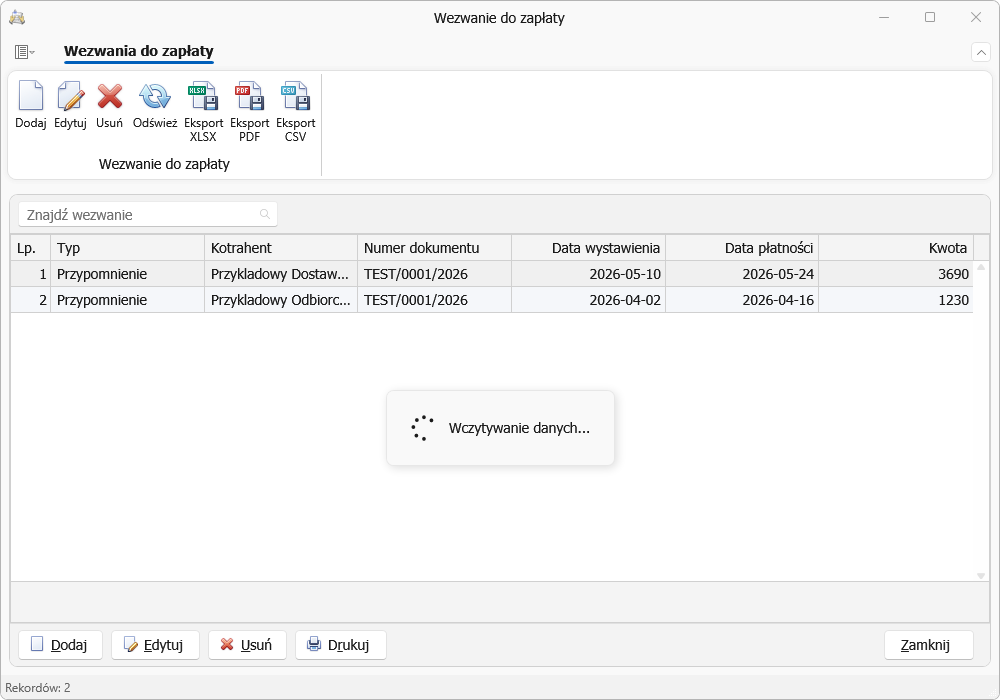
Company profiles in their own databases
Every company has its own database file, which keeps work with several entities tidy and makes backups easier. There is a multi-profile import from the 2026 release, and the installer can optionally set up a database server (MS SQL Express) for working over a network.
See more (Polish) →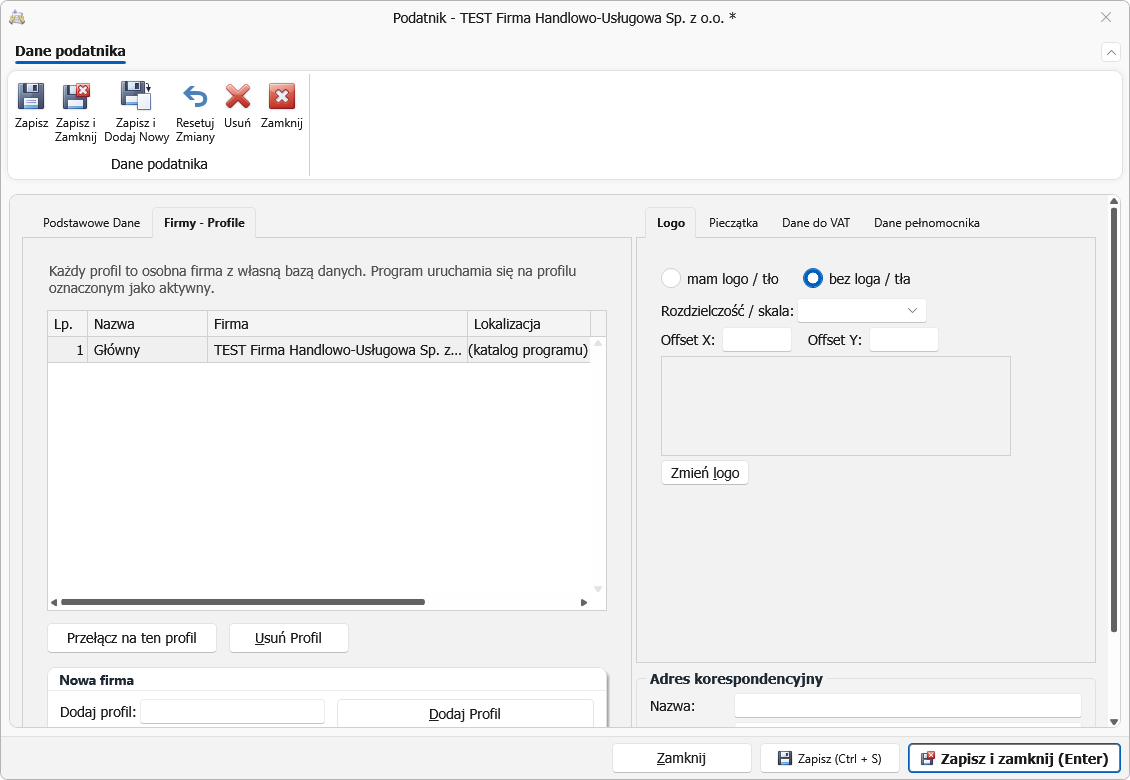
Users and access permissions
Every employee signs in to their own account with a password, and you grant access through permission profiles (for example Administrator, Accountant, Employee) — separately for each module of the program and each document type. You can also restrict a user to issuing invoices only, or stop them from settling transfer invoices.
See more (Polish) →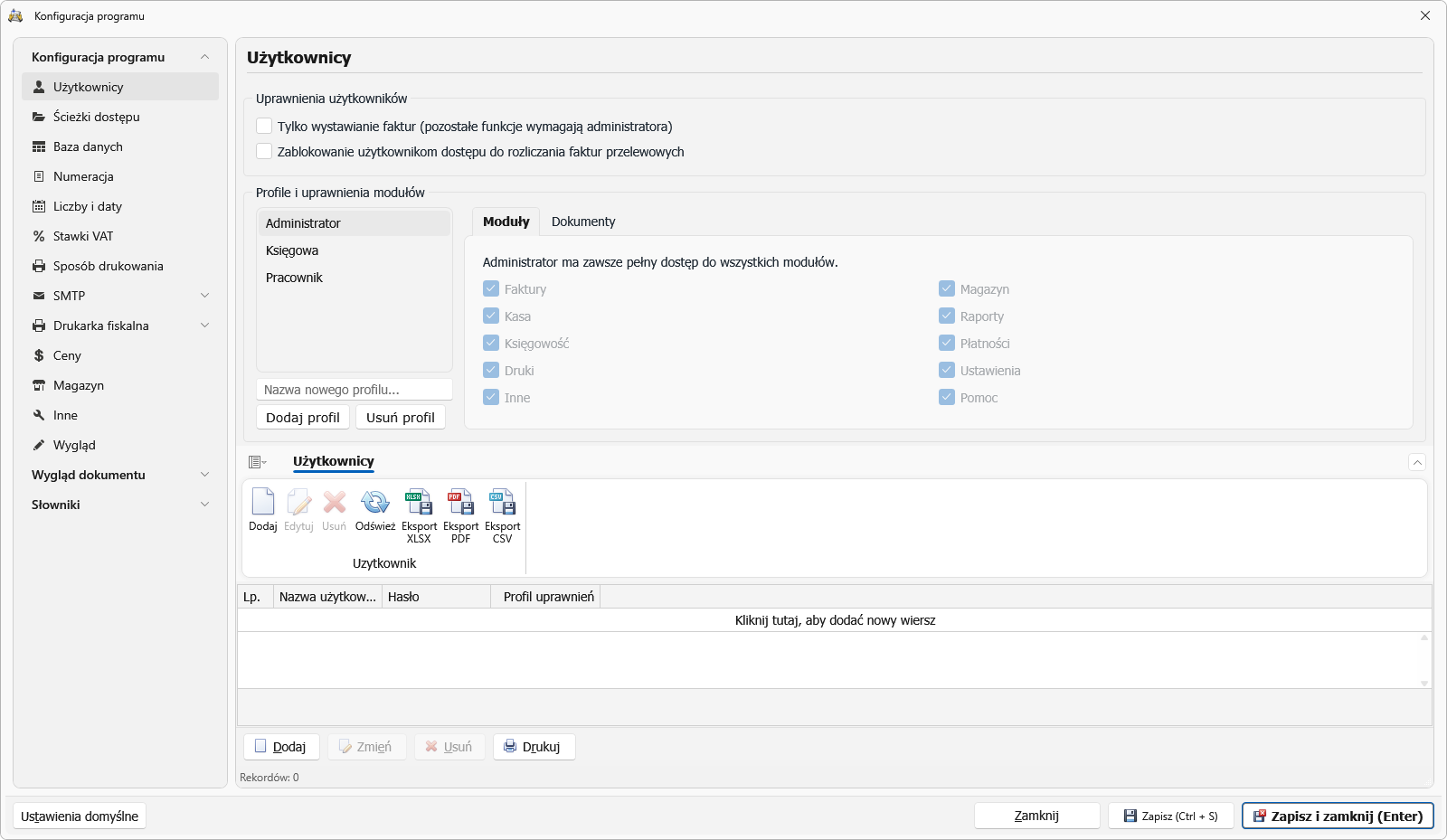
Trade: reservations, discounts and a credit limit
A customer order reserves the goods — stock levels show the reserved and the available quantity separately, and the program can block the release of goods promised elsewhere. There are new discounts and promotions with validity dates and a hierarchy of rules, a contractor credit limit that blocks sales once it is exceeded, auxiliary units (a box alongside a single item) and automatic issuing of a WZ/PZ document for an invoice. Four new warehouse reports: what to reorder, batches and cost layers, stock ageing, turnover and stock levels.
See more (Polish) →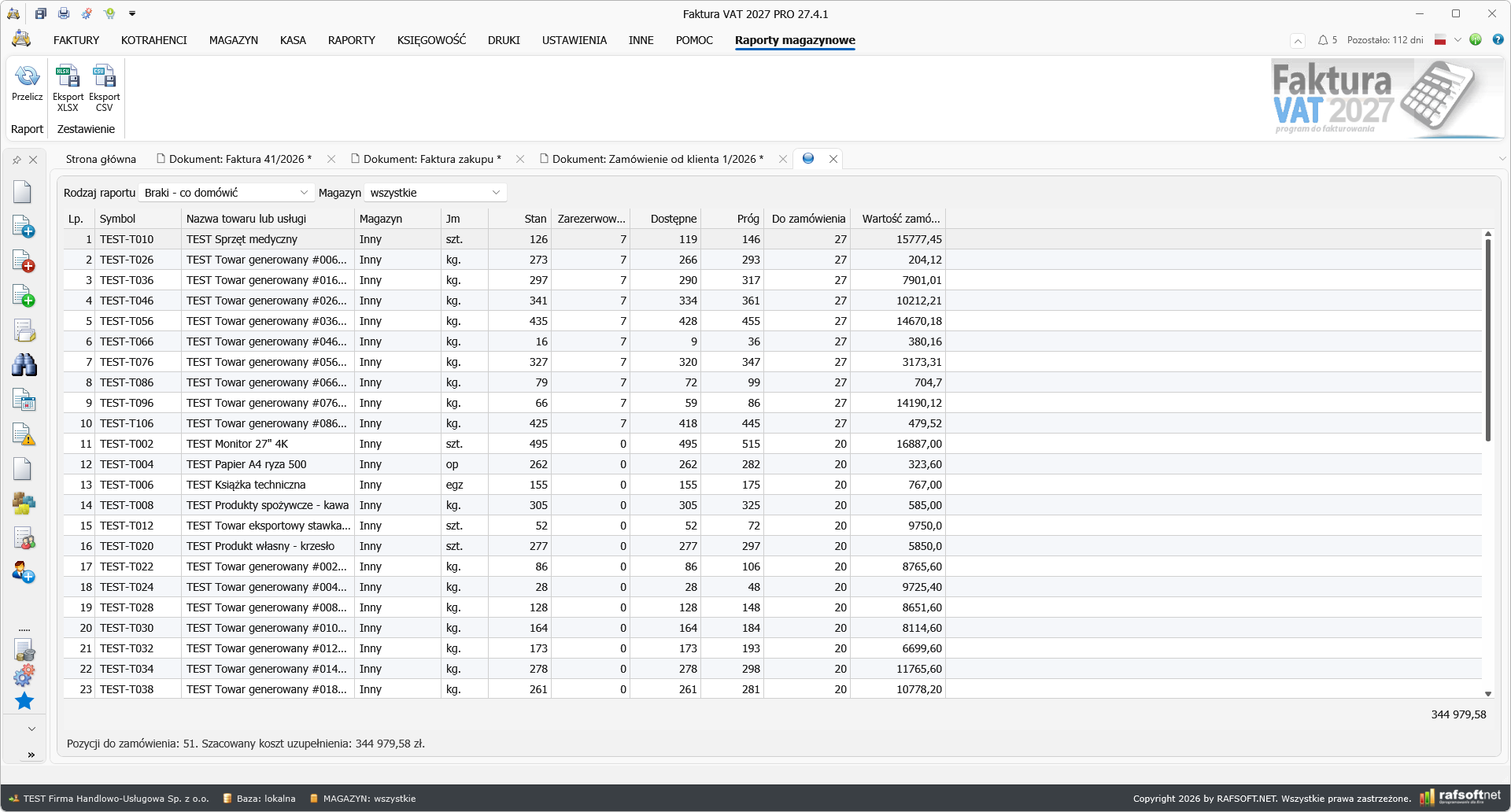
CRM and Service as separate modules
Two new groups have appeared in the navigation: CRM — contact history, tasks, notes and attachments on the customer, recurring invoices, an organiser and collection reminders with the demand level chosen automatically. And Service — service jobs with a fault description, a diagnosis and a report, a register of customer devices with serial number, warranty and repair history, your own job statuses and an engineer’s schedule in the calendar.
See more (Polish) →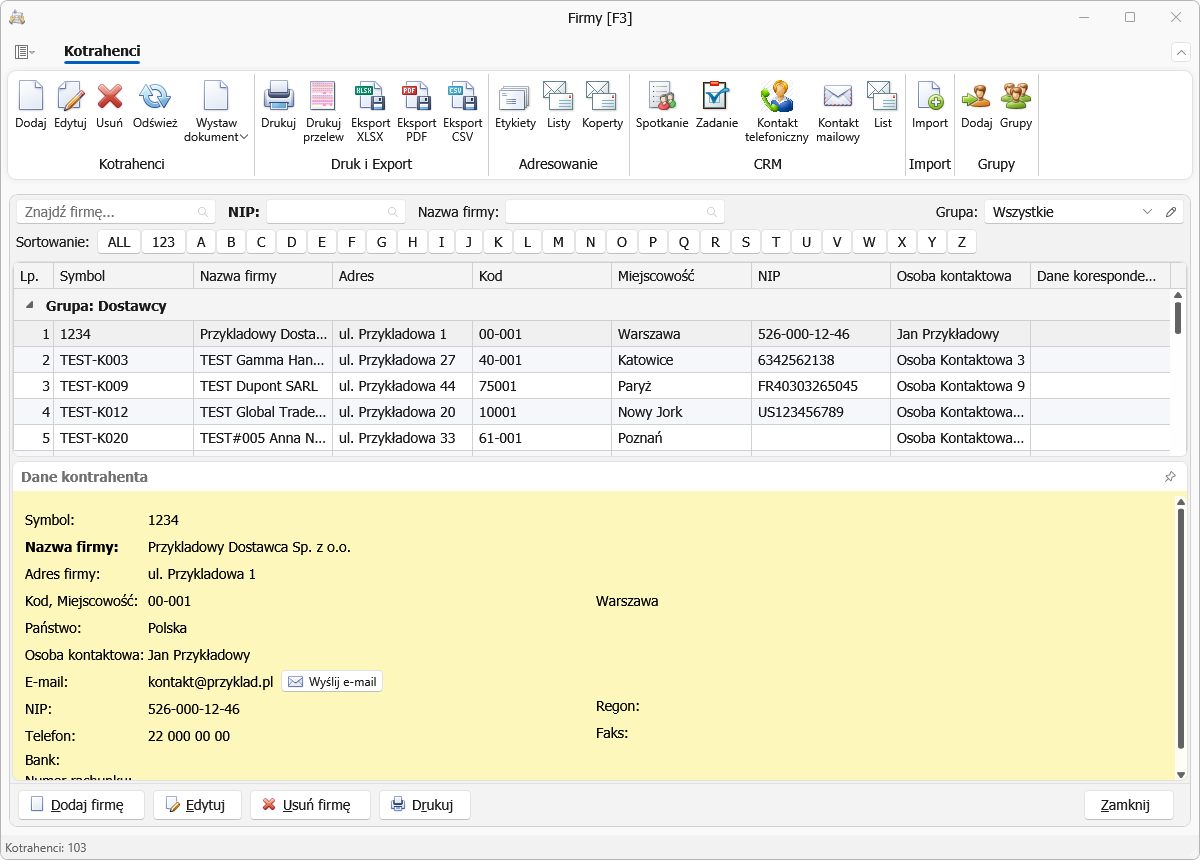
Analyses, reports and summaries
A heavily expanded analysis pillar: sales and purchase statistics in any breakdown, profit and margin analysis — by product, product group, contractor and account manager, rankings of your worst customers, suppliers and products, purchase summaries by supplier and by product, plus four warehouse reports: what to reorder, batches and cost layers, stock ageing, turnover and stock levels.
See more (Polish) →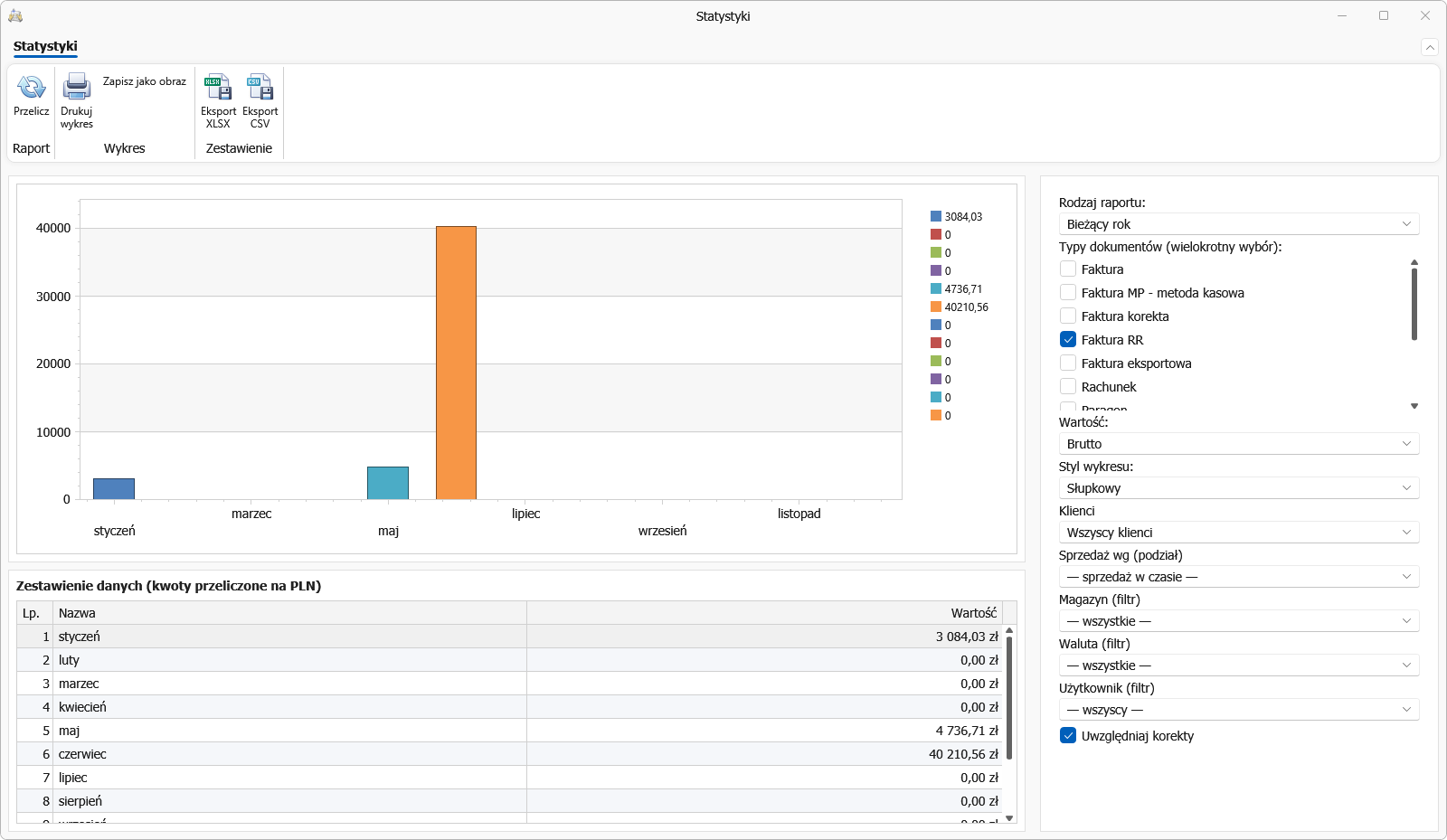
Your own invoice styles
You can match the invoice printout to your company: 8 ready-made styles to choose from, each of which can be changed and saved as your own. In the editor you set the logo and background, fonts, the columns of the line-item table, the stamp, the QR code and the text above and below the table — and you see the result straight away in the live preview, without printing anything.
See more (Polish) →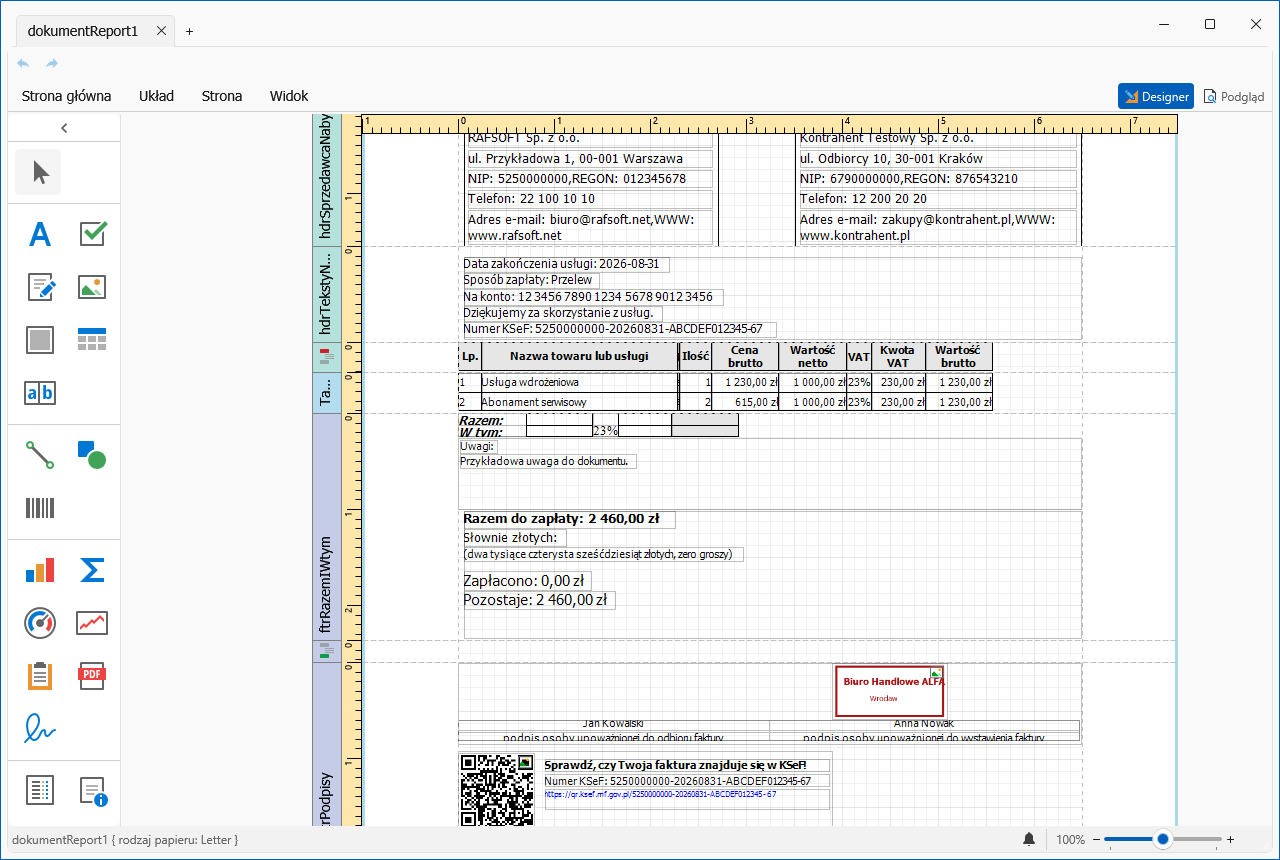
Online payments — your customer pays in one click
You attach a payment link to the invoice. Your customer clicks it in the e-mail or scans the QR code on the printout, pays by card or BLIK, and the program marks the invoice as settled by itself — with no retyping of the bank statement. There are five gateways to choose from: PayU, Przelewy24, Tpay, Stripe and PayPal. The payment goes into settlements with the source “Online gateway”, so the history shows that nobody entered it by hand. It works for invoices, pro-forma invoices, bills and receipts — in every edition of the program.
See more (Polish) →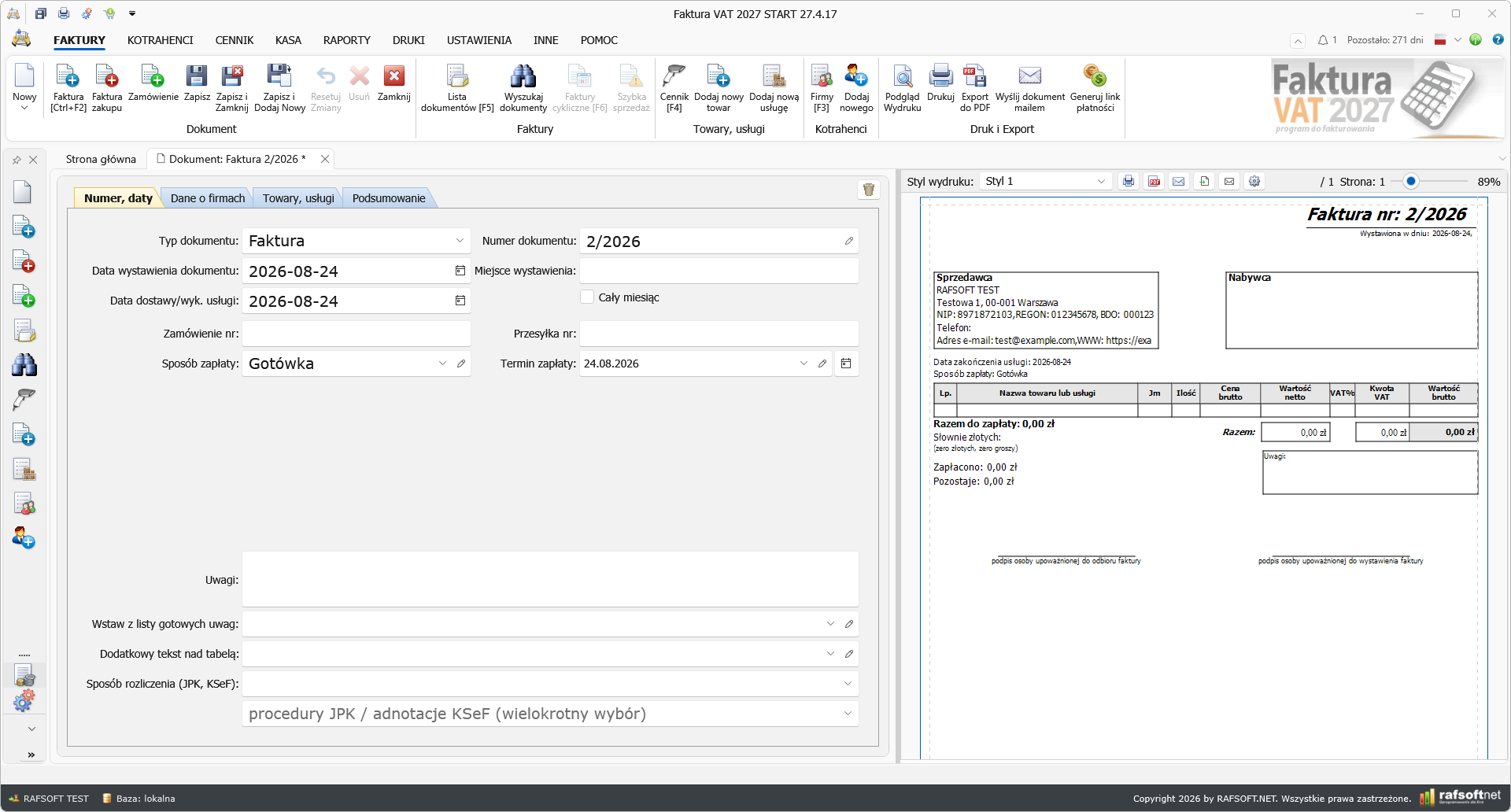
Bundles — several products as a single line item
A computer set, a back-to-school pack, a starter kit — the customer sees one line on the invoice with the name and price of the set, while all the components come off stock in the quantities given. You define the contents on the Bundle contents tab: you tick price-list items and give the quantity of each. The price of a bundle does not have to be the sum of its components — it is usually lower, because that is exactly what makes a set worth buying. A separate Assemble (RW + PW) command creates the set physically in the warehouse: it checks the parts are available, takes them off with an RW document and books the finished bundle in with a PW document valued at the cost of production. A change of contents applies to future sales — earlier documents keep the contents as at the time of sale, so history and stock levels stay consistent. The PRO edition.
See more (Polish) →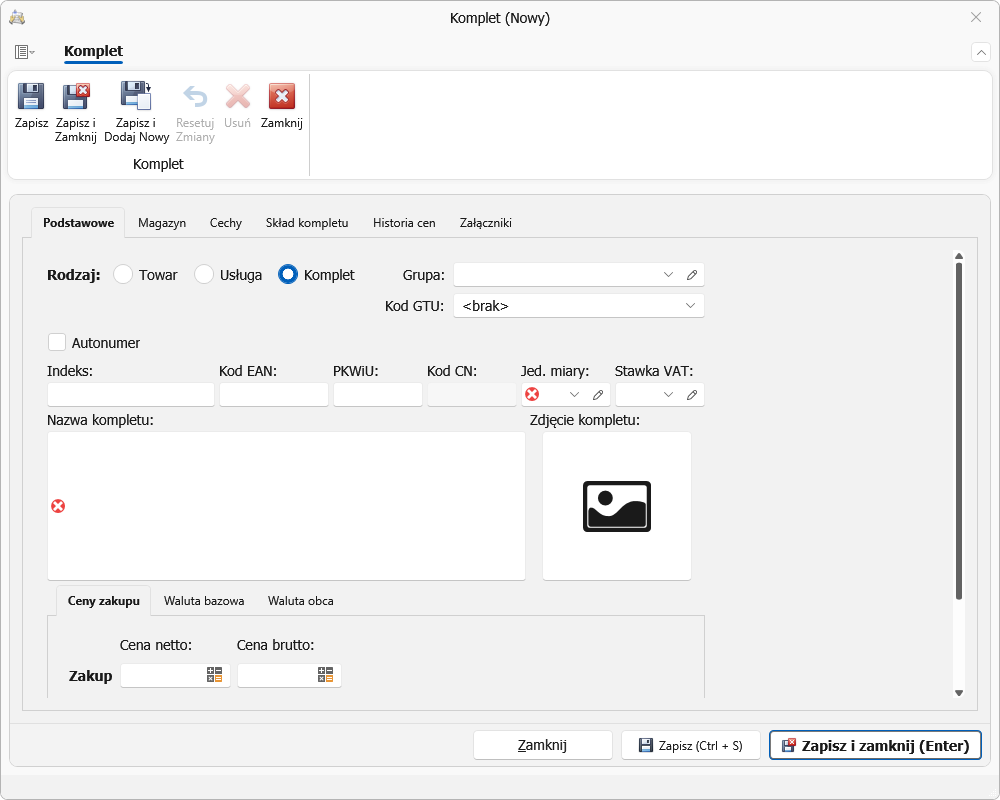
Invoice line items typed straight into the table
You add line items without opening a separate window — in the empty row at the top of the table. You pick the name from price-list suggestions (part of the name is enough), and in the same row you set the unit, quantity, discount, net and gross price and the VAT rate. Values and document totals are recalculated straight away, by the same logic as the line-item window; calculated columns — value and VAT amount — are read-only. The “New item” window remains available: you switch the way you work in Configuration → Appearance, without restarting the program.
See more (Polish) →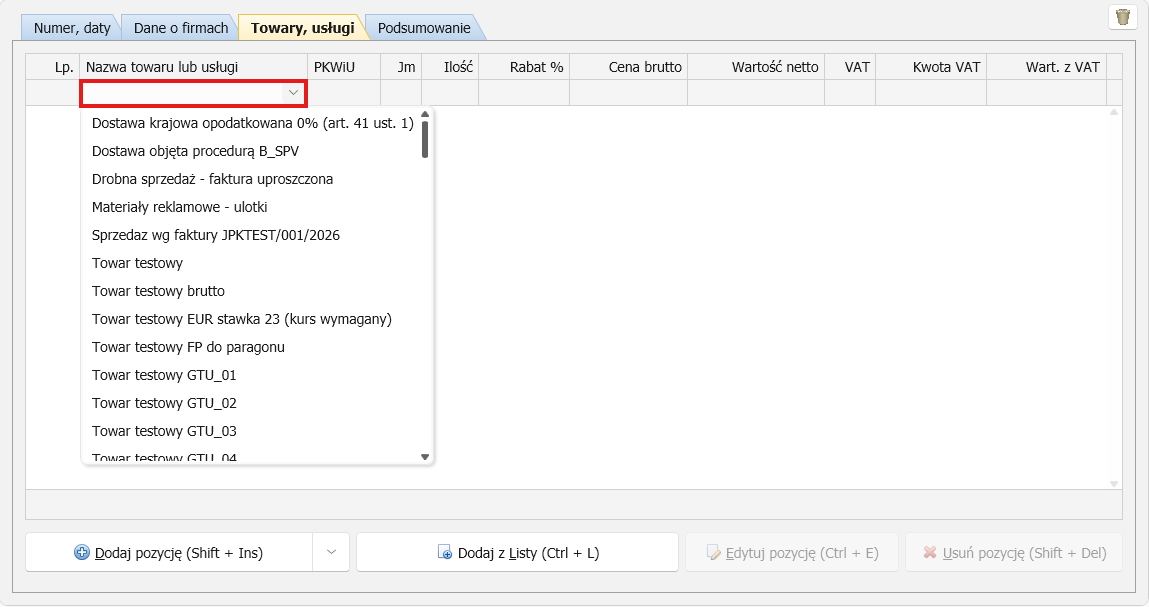
Stock levels sent to online shops
The program sends warehouse stock levels to WooCommerce, PrestaShop, Allegro and BaseLinker. What goes to the shop is the available quantity — stock less reservations from orders, so goods promised to one customer will not be offered to another. Products are matched by index (SKU, Reference, offer signature), and the program sends only those items whose stock has actually changed — subsequent synchronisations take moments. You start the transfer yourself with the “Send stock levels” button: the program does not connect to the shop in the background. The PRO edition.
See more (Polish) →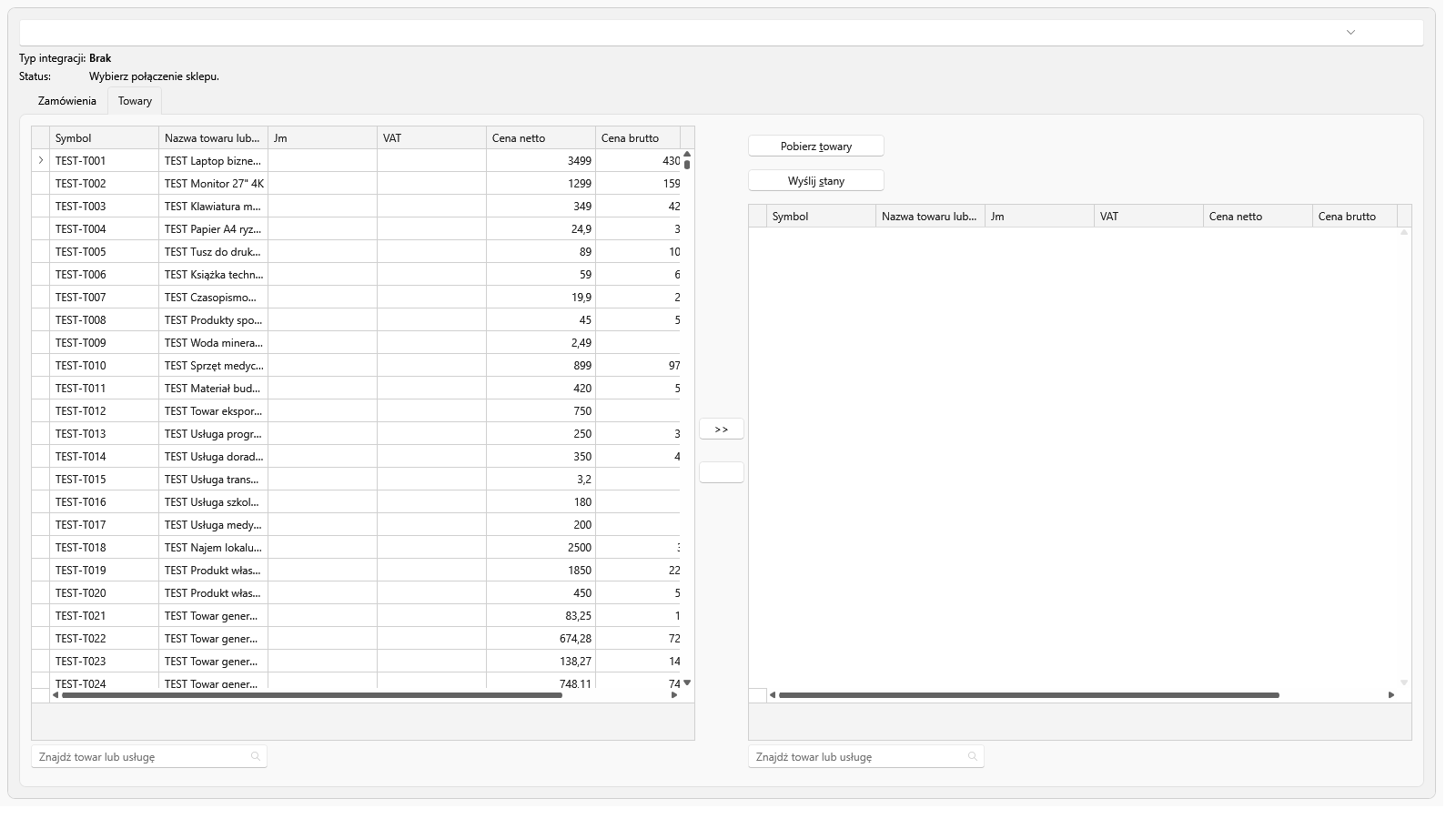
Three editions of the program
Choose the version that fits your company. An annual licence, no subscription — moving up to a higher edition does not require migrating your data.
Faktura VAT 2027 START
119 zł / year
Invoicing and KSeF for small and medium-sized businesses.
115 program features
- No limit on documents or contractors — available
- Invoicing — available
- Bills and receipts — available
- KSeF — sending and receiving — available
- JPK files + GTU codes — available
- VAT records — available
- PDF printouts and e-mail delivery — available
- Contractor lookup from the statistics office — available
- Contractor verifier — available
- Cash register and transfers — available
- Drukarki fiskalne — available
- Discounts and promotions — available
- Program users — available
- Payment demands and interest notes — available
- Data archiving — available
- QR codes — available
- Interface in 7 languages — available
- Asystent AI i pomoc księgowa — available
- Free updates — available
- Support for multiple entities — not available in this edition
- Recurring invoices — not available in this edition
- Mail merge printing — not available in this edition
- Bank statements — not available in this edition
- Elixir transfers — not available in this edition
- Postal forms — not available in this edition
- Statistics — not available in this edition
- Barcodes — not available in this edition
- Szybka sprzedaż (POS) — not available in this edition
- Warehouse — not available in this edition
- Warehouse documents — not available in this edition
- Wczytanie dokumentów magazynowych z pliku EPP — not available in this edition
- Stocktaking — not available in this edition
- JPK_MAG — not available in this edition
- Small-business bookkeeping (KPiR) — not available in this edition
- Lump-sum tax and fixed assets — not available in this edition
- Ewidencja wyposażenia — not available in this edition
- PIT returns — not available in this edition
- Contracts of mandate and for specific work — not available in this edition
- Lista płac — not available in this edition
- ZUS returns and PIT-11 — not available in this edition
- CRM — not available in this edition
- Service jobs — not available in this edition
- Mileage log — not available in this edition
- Profit and margin analysis — not available in this edition
- E-commerce integrations — not available in this edition
- Orders and quotations — available
- Data import and export — available
- Online payments — 5 gateways — available
- VAT white list and VIES — available
- Calendar and organiser — available
- Moje Biuro — paczka dla księgowego — available
- Mobilna Faktura — a free MINI account — available
Faktura VAT 2027 STANDARD
179 zł / year
Multiple companies, recurring invoices and postal forms.
138 program features
- No limit on documents or contractors — available
- Invoicing — available
- Bills and receipts — available
- KSeF — sending and receiving — available
- JPK files + GTU codes — available
- VAT records — available
- PDF printouts and e-mail delivery — available
- Contractor lookup from the statistics office — available
- Contractor verifier — available
- Cash register and transfers — available
- Drukarki fiskalne — available
- Discounts and promotions — available
- Program users — available
- Payment demands and interest notes — available
- Data archiving — available
- QR codes — available
- Interface in 7 languages — available
- Asystent AI i pomoc księgowa — available
- Free updates — available
- Support for multiple entities — available
- Recurring invoices — available
- Mail merge printing — available
- Bank statements — available
- Elixir transfers — available
- Postal forms — available
- Statistics — available
- Barcodes — available
- Szybka sprzedaż (POS) — available
- Warehouse — not available in this edition
- Warehouse documents — not available in this edition
- Wczytanie dokumentów magazynowych z pliku EPP — not available in this edition
- Stocktaking — not available in this edition
- JPK_MAG — not available in this edition
- Small-business bookkeeping (KPiR) — not available in this edition
- Lump-sum tax and fixed assets — not available in this edition
- Ewidencja wyposażenia — not available in this edition
- PIT returns — not available in this edition
- Contracts of mandate and for specific work — not available in this edition
- Lista płac — not available in this edition
- ZUS returns and PIT-11 — not available in this edition
- CRM — not available in this edition
- Service jobs — not available in this edition
- Mileage log — not available in this edition
- Profit and margin analysis — not available in this edition
- E-commerce integrations — not available in this edition
- Orders and quotations — available
- Data import and export — available
- Online payments — 5 gateways — available
- VAT white list and VIES — available
- Calendar and organiser — available
- Moje Biuro — paczka dla księgowego — available
- Mobilna Faktura — a free STANDARD account — available
Faktura VAT 2027 PRO
259 zł / year
Warehouse with reservations, KPiR, CRM and Service in one program.
192 program features
- No limit on documents or contractors — available
- Invoicing — available
- Bills and receipts — available
- KSeF — sending and receiving — available
- JPK files + GTU codes — available
- VAT records — available
- PDF printouts and e-mail delivery — available
- Contractor lookup from the statistics office — available
- Contractor verifier — available
- Cash register and transfers — available
- Drukarki fiskalne — available
- Discounts and promotions — available
- Program users — available
- Payment demands and interest notes — available
- Data archiving — available
- QR codes — available
- Interface in 7 languages — available
- Asystent AI i pomoc księgowa — available
- Free updates — available
- Support for multiple entities — available
- Recurring invoices — available
- Mail merge printing — available
- Bank statements — available
- Elixir transfers — available
- Postal forms — available
- Statistics — available
- Barcodes — available
- Szybka sprzedaż (POS) — available
- Warehouse — available
- Warehouse documents — available
- Wczytanie dokumentów magazynowych z pliku EPP — available
- Stocktaking — available
- JPK_MAG — available
- Small-business bookkeeping (KPiR) — available
- Lump-sum tax and fixed assets — available
- Ewidencja wyposażenia — available
- PIT returns — available
- Contracts of mandate and for specific work — available
- Lista płac — available
- ZUS returns and PIT-11 — available
- CRM — available
- Service jobs — available
- Mileage log — available
- Profit and margin analysis — available
- E-commerce integrations — available
- Orders and quotations — available
- Data import and export — available
- Online payments — 5 gateways — available
- VAT white list and VIES — available
- Calendar and organiser — available
- Moje Biuro — paczka dla księgowego — available
- Mobilna Faktura — a free MAX account — available
Comparison of editions
| Feature | START | STANDARD | PRO |
|---|---|---|---|
| No limit on documents or contractors | ✓ | ✓ | ✓ |
| Number of companies supported | 1 | ∞ | ∞ |
| Invoices and documents | |||
| No limit on documents or contractors | ✓ | ✓ | ✓ |
| VAT sales invoice | ✓ | ✓ | ✓ |
| Invoice corrections (in minus, in plus) | ✓ | ✓ | ✓ |
| VAT settlement period for corrections (KSeF FA(3) TypKorekty) | ✓ | ✓ | ✓ |
| Advance and final invoices | ✓ | ✓ | ✓ |
| Margin invoice | ✓ | ✓ | ✓ |
| Multicurrency and multilingual invoices | ✓ | ✓ | ✓ |
| Bilingual invoices (Polish with English, German, French, Czech or Swedish) | ✓ | ✓ | ✓ |
| Custom invoice layout designer: draggable logo, KSeF QR code, payment QR code and button, stamp | ✓ | ✓ | ✓ |
| Cash method VAT invoice (MP) | ✓ | ✓ | ✓ |
| Split payment | ✓ | ✓ | ✓ |
| VAT RR invoice (flat-rate farmer) with automatic 6.5% refund | ✓ | ✓ | ✓ |
| Internal invoice | ✓ | ✓ | ✓ |
| Reverse charge invoice (scrap) | ✓ | ✓ | ✓ |
| Intra-EU supply and acquisition invoices (WDT/WNT) | ✓ | ✓ | ✓ |
| Export invoice | ✓ | ✓ | ✓ |
| Simplified invoice (up to PLN 450) | ✓ | ✓ | ✓ |
| Re-invoicing | ✓ | ✓ | ✓ |
| Collective invoice | ✓ | ✓ | ✓ |
| Commercial invoice (PL/EN) and proforma | ✓ | ✓ | ✓ |
| Purchase invoice | ✓ | ✓ | ✓ |
| VAT-exempt invoices | ✓ | ✓ | ✓ |
| Bills and receipts (sales and purchase) | ✓ | ✓ | ✓ |
| Invoice for a receipt (FP) with receipt data and tax ID check | ✓ | ✓ | ✓ |
| Orders and quotations | ✓ | ✓ | ✓ |
| Internal order | ✓ | ✓ | ✓ |
| Service order | ✗ | ✗ | ✓ |
| Complaints: filing against a document, statutory 14-day deadline, resolution | ✗ | ✗ | ✓ |
| Internal cost document | ✓ | ✓ | ✓ |
| Quick sale (POS) — cash register mode | ✗ | ✓ | ✓ |
| Sales and purchase agreement | ✓ | ✓ | ✓ |
| Payment demands | ✓ | ✓ | ✓ |
| Interest note and correcting note | ✓ | ✓ | ✓ |
| PDF printing and e-mail sending | ✓ | ✓ | ✓ |
| Document cloning | ✓ | ✓ | ✓ |
| Serial document printing | ✗ | ✓ | ✓ |
| Recurring (subscription) invoices | ✗ | ✓ | ✓ |
| Selecting goods from the price list in the items table (columns, search, price level) | ✓ | ✓ | ✓ |
| Separate number series per warehouse | ✗ | ✗ | ✓ |
| Protection against duplicate document numbers | ✓ | ✓ | ✓ |
| Shared document numbering with Mobilna Faktura | ✓ | ✓ | ✓ |
| Postal forms and dispatch book | ✗ | ✓ | ✓ |
| Address labels | ✗ | ✓ | ✓ |
| Envelope and letter addressing | ✗ | ✓ | ✓ |
| KSeF (National e-Invoicing System) | |||
| Sending invoices to KSeF 2.0 | ✓ | ✓ | ✓ |
| Receiving purchase invoices from KSeF | ✓ | ✓ | ✓ |
| Importing sales invoices from KSeF | ✓ | ✓ | ✓ |
| Pre-send approval list for KSeF | ✓ | ✓ | ✓ |
| Blocking a document from KSeF submission | ✓ | ✓ | ✓ |
| Approving purchase invoices before import | ✓ | ✓ | ✓ |
| Trusted contractor - marker in purchase buffer | ✓ | ✓ | ✓ |
| Notification about new KSeF invoices | ✓ | ✓ | ✓ |
| Push notifications about new KSeF invoices (phone, e-mail) | ✓ | ✓ | ✓ |
| Offline modes (offline24, unavailability, failure) | ✓ | ✓ | ✓ |
| Login with token or certificate | ✓ | ✓ | ✓ |
| QR codes with KSeF number on printouts | ✓ | ✓ | ✓ |
| Submission statuses and UPO download | ✓ | ✓ | ✓ |
| KSeF-style invoice preview (print style) | ✓ | ✓ | ✓ |
| BDO number on invoice | ✓ | ✓ | ✓ |
| EORI number (in KSeF XML) | ✓ | ✓ | ✓ |
| KRS number and taxpayer status in KSeF XML | ✓ | ✓ | ✓ |
| Annex 15 goods marking (P_12_Zal_15) in KSeF | ✓ | ✓ | ✓ |
| Cash discount (skonto) on invoices and in KSeF | ✓ | ✓ | ✓ |
| Deposit return system: packaging deposit on invoices and K_360 / P_360 in JPK_V7 | ✓ | ✓ | ✓ |
| JST (local government) and VAT group support | ✓ | ✓ | ✓ |
| JPK files and declarations | |||
| JPK_V7M and JPK_V7K with GTU codes | ✓ | ✓ | ✓ |
| JPK_FA | ✓ | ✓ | ✓ |
| Importing JPK_FA and JPK_V7 files | ✓ | ✓ | ✓ |
| Importing contractors, price list and documents from CSV, XLSX and XML files | ✓ | ✓ | ✓ |
| Importing from trading and accounting software: EPP (EDI++) file | ✓ | ✓ | ✓ |
| Importing warehouse documents from EPP file (goods issue, goods receipt, transfer) | ✗ | ✗ | ✓ |
| VAT-EU statement (intra-EU transactions) | ✓ | ✓ | ✓ |
| VAT-UEK correction of the recapitulative statement | ✓ | ✓ | ✓ |
| VAT-8 and VAT-9M declarations | ✓ | ✓ | ✓ |
| VIU-DO declaration (OSS) | ✓ | ✓ | ✓ |
| JPK_WB (bank statement) | ✗ | ✓ | ✓ |
| JPK_MAG (warehouse documents) | ✗ | ✗ | ✓ |
| JPK_PKPIR (ledger) | ✗ | ✗ | ✓ |
| JPK_EWP (lump-sum tax) | ✗ | ✗ | ✓ |
| JPK_ST (fixed assets) | ✗ | ✗ | ✓ |
| Annual PIT-36, PIT-36L and PIT-28 returns | ✗ | ✗ | ✓ |
| ZUS DRA declaration | ✗ | ✗ | ✓ |
| ZUS RCA and RSA individual reports | ✗ | ✗ | ✓ |
| ZUS registrations: ZUA, ZZA, ZWUA, RUD | ✗ | ✗ | ✓ |
| PIT-11 and PIT-4R declarations | ✗ | ✗ | ✓ |
| My Office - document package for the accountant | ✓ | ✓ | ✓ |
| Companies and contractors | |||
| Number of companies | 1 | ∞ | ∞ |
| Company profiles - separate databases | ✗ | ✓ | ✓ |
| Contractor database | ✓ | ✓ | ✓ |
| Deactivating records instead of deleting | ✓ | ✓ | ✓ |
| Control of automatic additions to the price list and company list | ✓ | ✓ | ✓ |
| Contractor role: customer / supplier | ✓ | ✓ | ✓ |
| Credit limit with sales blocking | ✓ | ✓ | ✓ |
| Manual contractor block with reason | ✓ | ✓ | ✓ |
| Multiple delivery addresses per contractor | ✓ | ✓ | ✓ |
| CRM - contacts, tasks, notes, attachments | ✗ | ✗ | ✓ |
| Users and access permissions | ✓ | ✓ | ✓ |
| Interface in 7 languages | ✓ | ✓ | ✓ |
| Multicurrency - NBP rates and exchange differences | ✓ | ✓ | ✓ |
| Cash, payments and registers | |||
| Payment register and due dates | ✓ | ✓ | ✓ |
| Cash report, KP and KW forms | ✓ | ✓ | ✓ |
| Bank forms BW and BP | ✓ | ✓ | ✓ |
| Bank, ZUS and tax office transfers (micro-account) | ✓ | ✓ | ✓ |
| VAT records and sales report | ✓ | ✓ | ✓ |
| Cash-basis VAT accounting | ✓ | ✓ | ✓ |
| Bank statements (MT940, CSV) | ✗ | ✓ | ✓ |
| Custom MT940 and CSV statement formats with bank file preview | ✗ | ✓ | ✓ |
| Automatic payment matching | ✗ | ✓ | ✓ |
| Elixir transfer batch export | ✗ | ✓ | ✓ |
| Transfer batch history (status, settlement, cancellation) | ✗ | ✓ | ✓ |
| Cards and BLIK: terminal transaction register | ✗ | ✓ | ✓ |
| Card pre-authorisation and settlement | ✗ | ✓ | ✓ |
| Multiple cash registers | ✗ | ✓ | ✓ |
| Foreign currency cash register (NBP rate, PLN value) | ✗ | ✓ | ✓ |
| Interest rates effective from date (segment calculation) | ✓ | ✓ | ✓ |
| Statutory, commercial and tax interest | ✓ | ✓ | ✓ |
| Interest calculator | ✗ | ✓ | ✓ |
| Debt collection: reminders and demands | ✓ | ✓ | ✓ |
| Online payment links (PayU, Przelewy24, Tpay, Stripe, PayPal) | ✓ | ✓ | ✓ |
| QR code and 'Click and pay' button on PDF and in e-mail | ✓ | ✓ | ✓ |
| Automatic invoice settlement after online payment | ✓ | ✓ | ✓ |
| Warehouse and accounting | |||
| Price list of goods and services, photos, 3 price levels | ✓ | ✓ | ✓ |
| Auxiliary units of measure | ✗ | ✗ | ✓ |
| Discounts and promotions (7 rule levels) | ✓ | ✓ | ✓ |
| Quantity thresholds in discounts (cheaper from 10 pcs) | ✓ | ✓ | ✓ |
| Bulk price change: percentage, amount, markup on purchase price | ✓ | ✓ | ✓ |
| Product barcodes | ✗ | ✓ | ✓ |
| Multiple barcodes per product, substitutes, product group tree | ✓ | ✓ | ✓ |
| Product dimensions, country of origin and default GTU marking | ✓ | ✓ | ✓ |
| Warning about a duplicate product index or EAN code when saving the product card | ✓ | ✓ | ✓ |
| Warehouse module (multiple warehouses) | ✗ | ✗ | ✓ |
| Opening stock: goods receipt document, CSV import, quick add in the stock window, stocktaking, EPP document import | ✗ | ✗ | ✓ |
| Stock levels, reservations and available quantity | ✗ | ✗ | ✓ |
| Time-limited reservations and customer reservation list | ✗ | ✗ | ✓ |
| Order fulfilment: partial issue, fulfilled and remaining quantities | ✗ | ✗ | ✓ |
| Documents WZ, PZ, MM, RW and PW | ✗ | ✗ | ✓ |
| Automatic WZ/PZ for invoices | ✗ | ✗ | ✓ |
| Receiving KSeF purchases into the warehouse | ✗ | ✗ | ✓ |
| Returning goods from a correction to the warehouse | ✗ | ✗ | ✓ |
| Issue valuation: FIFO, LIFO, AVCO, FEFO, batch selection | ✗ | ✗ | ✓ |
| Stocktaking and physical inventory | ✗ | ✗ | ✓ |
| Backdated stocktaking — book stock as at the stocktaking date | ✗ | ✗ | ✓ |
| Warehouse reports: shortages, batches, ageing, turnover, unfulfilled orders, rotation | ✗ | ✗ | ✓ |
| Receivables ageing buckets (current, 1-30, 31-60, 61-90, over 90 days) | ✗ | ✗ | ✓ |
| Contractor balances: receivables, payables and credit limit usage | ✗ | ✗ | ✓ |
| Netting: offsetting mutual receivables and payables | ✓ | ✓ | ✓ |
| Warehouse locations and picking list | ✗ | ✗ | ✓ |
| Shipment register: carrier, waybill number, status, COD, tracking link | ✗ | ✓ | ✓ |
| Product variants (size, colour) generated from attribute combinations | ✗ | ✗ | ✓ |
| Sales by account manager | ✗ | ✓ | ✓ |
| Purchase orders generated from the shortage report (target level, grouping by supplier) | ✗ | ✗ | ✓ |
| Warehouse operation summaries | ✗ | ✗ | ✓ |
| Product attributes | ✗ | ✗ | ✓ |
| Profit and margin analysis | ✗ | ✗ | ✓ |
| Small accounting - revenue and expense ledger (KPiR) | ✗ | ✗ | ✓ |
| Revenue records (lump-sum tax) | ✗ | ✗ | ✓ |
| Fixed assets and depreciation | ✗ | ✗ | ✓ |
| Equipment register | ✗ | ✗ | ✓ |
| Asset printouts: register, equipment, depreciation table | ✗ | ✗ | ✓ |
| Income tax - PIT advances | ✗ | ✗ | ✓ |
| Mandate, specific-task and employment contracts | ✗ | ✗ | ✓ |
| Payroll list | ✗ | ✗ | ✓ |
| Overtime, PPK and bailiff deductions | ✗ | ✗ | ✓ |
| ZUS contributions | ✗ | ✗ | ✓ |
| Mileage log | ✗ | ✗ | ✓ |
| Cost categories | ✗ | ✓ | ✓ |
| Vehicle expenses | ✗ | ✗ | ✓ |
| Simplified sales register | ✗ | ✗ | ✓ |
| Organiser with calendar | ✓ | ✓ | ✓ |
| Statistics with charts | ✗ | ✓ | ✓ |
| Integrations | |||
| Fiscal printers: Posnet, Novitus, Elzab | ✓ | ✓ | ✓ |
| Barcode scanner | ✓ | ✓ | ✓ |
| Network operation - SQLite, MS SQL, MySQL | ✓ | ✓ | ✓ |
| Data import and export (.fkt, FVAT 2002-2026, XLSX, CSV) | ✓ | ✓ | ✓ |
| Allegro integration | ✗ | ✗ | ✓ |
| Online stores: WooCommerce, PrestaShop, BaseLinker | ✗ | ✗ | ✓ |
| Sending stock levels to the store (WooCommerce, PrestaShop, Allegro, BaseLinker) | ✗ | ✗ | ✓ |
| Trans.eu - transport orders and freight invoices | ✗ | ✗ | ✓ |
| Export to accounting software: JPK_FA, EPP (EDI++), Comarch ERP Optima, Symfonia, Szark | ✓ | ✓ | ✓ |
| Importing from trading and accounting software: EPP (EDI++) file | ✓ | ✓ | ✓ |
| Importing warehouse documents from EPP file (goods issue, goods receipt, transfer) | ✗ | ✗ | ✓ |
| Mobilna Faktura - synchronisation | ✓ | ✓ | ✓ |
| Contractor verification: GUS, VAT white list, VIES | ✓ | ✓ | ✓ |
| Support and updates | |||
| Backup and data archiving | ✓ | ✓ | ✓ |
| Restore database to initial state | ✓ | ✓ | ✓ |
| Operation history (event log) | ✓ | ✓ | ✓ |
| Free updates | ✓ | ✓ | ✓ |
| Reminder about the approaching end of the licence | ✓ | ✓ | ✓ |
| Free technical support | ✓ | ✓ | ✓ |
| Online documentation and F1 help | ✓ | ✓ | ✓ |
| AI virtual assistant on rafsoft.net | ✓ | ✓ | ✓ |
| AI Agent — accounting assistant and AI helper | ✓ | ✓ | ✓ |
The full list of the program's features. Details of each edition: START, STANDARD, PRO · program documentation (Polish).
In the PRO edition the product price list is part of the Warehouse module — alongside prices it also keeps stock levels and goods receipt and issue documents.
Project progress
—Current stage: building the interfaces, application appearance and translations — due by 10 August 2026.
Work schedule (roadmap)
-
Building the interfaces, application appearance and translations
July 2026 -
Alpha version — first test release
30 July 2026 -
Beta version — public release available to download
from 9 August 2026 -
Warehouse, bundles, stocktaking and issue valuation
by 17 August 2026 -
Accounting: KPiR, lump-sum tax, fixed assets, annual PIT returns
by 19 August 2026 -
Trade: reservations, discounts, credit limit, CRM and Service
by 20 August 2026 -
Beta testing and user feedback
by 30 September 2026 -
Official 2027 release: START, STANDARD, PRO
20–30 October 2026
Download the beta version
x64 and ARM64 installers (~78 MB) plus portable versions that need no installation (~176 MB). Changelog.
This is a test version — it may contain bugs. For your day-to-day invoicing use Faktura VAT 2026.
Downloading the beta version
The beta 27.6.377 version is available to download here and on the free trial versions page, where you will also find the ARM64 installers and the portable versions. The program checks for updates itself at start-up, so it will download subsequent releases automatically.
See what each edition will contain: START, STANDARD, PRO · 2027 program documentation (Polish).
Until the full version is released we recommend the stable annual release — Faktura VAT 2026 with KSeF 2.0 integration.
Customer reviews
"I really took to the program — a friendly interface, ease of use, only the features you actually need brought together, and that is exactly what suits me..."
"A very clear program, and the invoice looks SUPERB. HIGHLY RECOMMENDED"
"Congratulations on the program — it is legible and really nicely put together :)."
"A great invoicing program, very clear; as far as I am concerned it is superb, I had been looking for one like this for ages."
"I like your program: it is clear, professional and easy to use."