
JPK files
online in your browser
Generate and submit JPK_V7M, JPK_V7K, JPK_PKPIR and JPK_EWP straight from the records — with no program to install. In Mobilna Faktura the JPK files are created automatically from invoices; you submit them to the tax administration from the panel and download the UPO receipts, including from a phone.
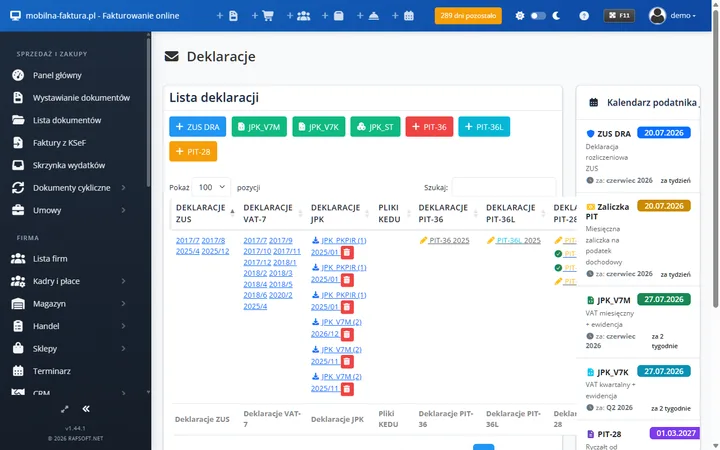
What are JPK files and why generate JPK online?
JPK (the Standard Audit File for Tax) is a set of structured XML files submitted to the National Revenue Administration. The most important of them, JPK_V7M / JPK_V7K, combines the VAT records and the VAT return. Generating JPK online means you create and submit these files straight from your browser.
Generating JPK online instead of retyping data
The classic problem is doing the work twice: first you issue the invoices, then you build the JPK file separately. In Mobilna Faktura that step disappears — sales and purchases go automatically into the VAT registers and the ledger, and the JPK_V7M, JPK_PKPIR or JPK_EWP file is created from data you already hold.
As a result you generate JPK files online in a single click, with no transcription errors, and submit them to the tax administration from the panel straight away — together with downloading the UPO receipt.
JPK files online cover
- JPK_V7M — VAT records and return (monthly)
- JPK_V7K — VAT records and return (quarterly)
- JPK_PKPIR — the Revenue and Expense Ledger
- JPK_EWP — lump-sum tax records
- Submission from the panel
- Downloading the UPO receipts
What generating JPK online in Mobilna Faktura includes
A complete toolkit for creating and submitting JPK files — in a single panel, together with invoicing and the records.
JPK_V7M and JPK_V7K
The combined VAT records and return file — monthly (JPK_V7M) and quarterly (JPK_V7K), generated automatically from the sales and purchase registers.
JPK_PKPIR
The Revenue and Expense Ledger file created straight from the accounting entries generated by your invoices — ready to hand over to the tax administration.
JPK_EWP
The revenue records file for the lump-sum tax, generated online from your sales data, split by lump-sum rate.
Submission and UPO
You submit the JPK files to the National Revenue Administration directly from the panel and download the Official Receipt Confirmation (UPO) — the complete set of confirmations in one place.
Data from invoices
An issued invoice automatically feeds the VAT register and the ledger — the JPK files are created without retyping data by hand.
KSeF 2.0
Sales and purchases from the National e-Invoicing System reach the records consistently with your e-invoices, and from there the JPK files.
Who is generating JPK online for?
Active VAT payers
You file JPK_V7M or JPK_V7K every month or quarter and want to generate and submit the file online, with no external gateways and no program to install.
KPiR and lump-sum taxpayers
You settle through the KPiR or the lump-sum tax and need the JPK_PKPIR or JPK_EWP files generated automatically from the records.
Sole traders
You want to submit JPK files to the tax administration yourself, without an accounting office — with the data ready and the UPO receipts downloaded from the panel.
People working on the move
You run your business from a laptop or a phone and want to generate and submit JPK from anywhere, without installing a program on a computer.
Online or on Windows? Both versions generate JPK files
Mobilna Faktura generates JPK files in the cloud — from a browser and a phone, with no installation, with submission to the tax administration and UPO download from the panel. Ideal when you want to work online from anywhere.
Faktura VAT 2026 is a desktop program for Windows that creates JPK files locally on your computer — you keep the data with you and the program works offline, without the cloud.
Both products support the same JPK structures and automate the data from invoices. The choice depends on whether you prefer to generate JPK online or locally.
JPK files online
in Mobilna Faktura plans
- JPK_V7M and JPK_V7K
- JPK_PKPIR and JPK_EWP
- Submission from the panel
- Downloading the UPO receipts
- KSeF 2.0
Frequently asked questions about JPK files online
Can I generate JPK files online, in a browser?
Yes. Mobilna Faktura generates JPK files online, straight in the browser — with no installation. JPK_V7M, JPK_V7K, JPK_PKPIR and JPK_EWP are created automatically from the records, and you download the file or submit it to the tax administration from the panel, including from a phone.
Which JPK files does online JPK generation support?
The supported structures are: JPK_V7M and JPK_V7K (VAT records and return — monthly and quarterly), JPK_PKPIR (the Revenue and Expense Ledger) and JPK_EWP (lump-sum tax records). The files are created from data you already hold in the system once you have issued your invoices.
What is JPK_V7M online and when is it filed?
JPK_V7M is the combined VAT records and return file filed monthly by taxpayers who settle VAT monthly. In Mobilna Faktura it is created automatically from the sales and purchase registers, and you then submit it to the tax administration and download the UPO.
Can JPK files online be submitted and can I download the UPO?
Yes. Submission to the National Revenue Administration happens directly from the panel — with no external gateways. Once processed you download the Official Receipt Confirmation (UPO), stored together with the submitted files.
Where do JPK files online get their data from?
The data comes from the records created automatically from invoices and purchase documents. You retype nothing by hand — sales and purchases, including e-invoices from KSeF 2.0, reach the VAT registers and the ledger, and from there the JPK files.
How does generating JPK online differ from a Windows program?
Mobilna Faktura generates JPK files in the cloud — from a browser and a phone, with no installation, with submission to the tax administration from the panel. Faktura VAT 2026 creates JPK files locally on Windows, offline. Both support the same JPK structures.
Find out more
Generate JPK files online
JPK_V7M, JPK_V7K, JPK_PKPIR and JPK_EWP created automatically from invoices, with submission to the tax administration and UPO download from the panel. Try Mobilna Faktura and create a free account, or choose the Windows edition.