
KPiR online
revenue and expense ledger in the cloud
Keep your KPiR and lump-sum records online in a browser — with automatic entries from invoices, JPK_PKPIR and JPK_EWP files and PIT returns. The revenue and expense ledger in Mobilna Faktura, available from any device, with no installation.
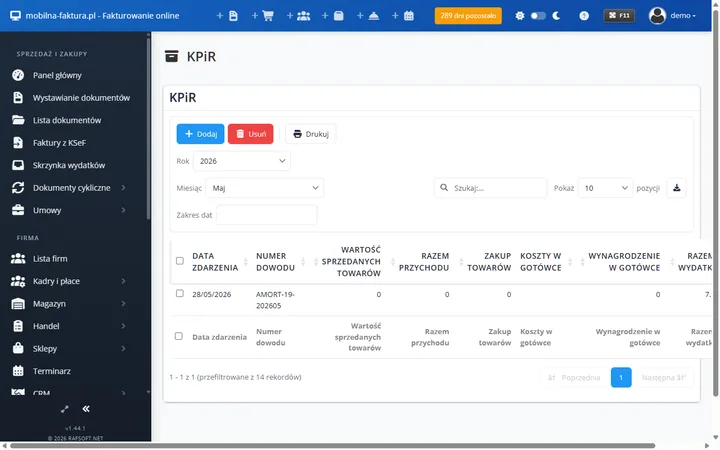
What is KPiR online?
KPiR online is the Revenue and Expense Ledger kept in a browser, in the cloud, with no program to install. In Mobilna Faktura the ledger entries are created automatically from the invoices you issue, and the ledger and the JPK files are available from any device.
A ledger kept up to date, without retyping
The biggest problem in keeping a KPiR is doing the work twice: first you issue an invoice, then you manually transfer it into the ledger. In the online version that step disappears — every invoice you issue goes automatically into the KPiR or the lump-sum records.
As a result the revenue and expense ledger is always current, and you generate JPK_PKPIR / JPK_EWP files and PIT returns in a single click from data you already hold in the system — from a browser, with no installation.
KPiR online covers
- Revenue and Expense Ledger
- Lump-sum tax records
- Automatic entries from invoices
- JPK_PKPIR and JPK_EWP files
- PIT-36, PIT-36L and PIT-28 returns
- Access from a browser and a phone
What KPiR and lump-sum records online in Mobilna Faktura include
A complete toolkit for keeping your own ledger in the cloud — together with invoicing, in a single panel.
KPiR in the cloud
The revenue and expense ledger is kept automatically and in line with the regulations — based on the documents you issue and post.
Lump-sum tax online
Revenue records for the lump-sum tax split by rate. The program assigns revenue to the correct rate and calculates the tax base.
JPK_PKPIR and JPK_EWP
Generate JPK files straight from the ledger and submit them to the tax administration from the online panel, together with the UPO receipts.
PIT returns
Submit the PIT-36, PIT-36L and PIT-28 e-returns directly from the panel. The taxpayer's calendar reminds you of the deadlines.
Entries from invoices
An issued invoice automatically creates an entry in the KPiR or the lump-sum records — no more entering data twice.
From any device
You keep the ledger online in a browser — from a laptop and a phone. The data synchronises automatically, with no database to move around.
Who is KPiR online for?
Sole traders
You settle your tax through the KPiR and want to keep the ledger yourself online, without the fixed cost of an accounting office for straightforward settlements.
Lump-sum taxpayers
You settle through the lump-sum tax on recorded revenue and need records split by rate, plus JPK_EWP and PIT-28 online.
Freelancers and service providers
You issue a handful to a dozen or so invoices a month. Automatic ledger entries and JPK generation save time and remove errors.
People working on the move
You run your business from a laptop or a phone and want access to the ledger from anywhere, with no program to install.
Online or on Windows? Both keep a KPiR
Mobilna Faktura is a KPiR online in the cloud — available from a browser and a phone, with no installation and with automatic synchronisation. Ideal when you want to keep the ledger from anywhere.
Faktura VAT 2026 with the KPiR is a desktop program for Windows with the ledger kept locally — you keep the data with you and the program works offline, without the cloud.
Both products automate entries from invoices and generate JPK_PKPIR / JPK_EWP and PIT returns. The choice depends on whether you prefer online or local accounting.
KPiR online
in Mobilna Faktura plans
- KPiR and lump-sum tax
- JPK_PKPIR and JPK_EWP
- PIT returns
- Automatic entries from invoices
- From a browser and a phone
Frequently asked questions about KPiR online
What is KPiR online?
KPiR online is the Revenue and Expense Ledger kept in a browser, in the cloud, with no program to install. In Mobilna Faktura the entries are created automatically from the invoices you issue, and the ledger is available from any device.
Can I also settle the lump-sum tax in the online version?
Yes. Besides the KPiR, the program keeps lump-sum records online split by rate and generates the JPK_EWP file and the PIT-28 return.
Are KPiR entries created automatically from invoices?
Yes. Every invoice you issue automatically creates an entry in the KPiR or the lump-sum records — with no retyping. The ledger is kept up to date, without errors or duplicated work.
Which JPK files and tax returns can I generate?
The program generates JPK_PKPIR (KPiR) and JPK_EWP (lump-sum tax) as well as the PIT-36, PIT-36L and PIT-28 returns. Submission from the panel, UPO receipts in one place.
How does KPiR online differ from a Windows program?
You keep the KPiR online in the cloud — from a browser and a phone, with no installation. Faktura VAT 2026 with the KPiR runs locally on Windows, offline. Both automate entries from invoices and generate JPK_PKPIR.
Find out more
Keep your KPiR online
The revenue and expense ledger and the lump-sum records in the cloud — with entries created automatically from invoices, JPK files and PIT returns. Create an account in Mobilna Faktura or choose the Faktura VAT 2026 program with the KPiR for Windows.